


 By
By Most of the Shopify SEO advice out there treats collection pages as an afterthought.
Fix your technical SEO, write some blog posts, build a few backlinks, and maybe tidy up your collections at some point if there's time left over.
That order is backwards.
Collection pages and product pages are where most of your organic revenue is going to come from, not blog posts, not the homepage.
A single well-built collection page can rank for dozens of related searches at once.
A blog post usually earns its keep on branding and trust, not direct sales.
I've said this directly to clients before: the average blog post on a Shopify store converts at somewhere around 0.02 to 0.2%.
Collection pages are where a shopper with real buying intent actually lands.
This guide walks through Shopify collection page SEO the way I actually run it with clients. How collection pages fit into the bigger picture, how to find the right keywords for them (including the subcollection strategy most stores never touch), how to build and write the page itself, how to link your collections together, where backlinks should and shouldn't go, and the technical details that quietly make or break all of it.
If you've searched around for shopify collections seo advice before landing here, you've probably noticed how much the word-count and structure recommendations contradict each other from one guide to the next.
That's mostly because most of them skip the one step that actually settles it: checking what's ranking for your specific keyword right now, not applying a generic rule.
Where Collection Pages Fit Into Your Shopify SEO Strategy
Shopify SEO isn't one thing.
It's four pieces working together: technical SEO, on-page optimization and content, internal linking, and backlinks.
Miss one and the other three underperform, no matter how well you execute them individually.
Here's why collection pages specifically sit at the center of that system, not on the edge of it.
A product page can realistically target one or two specific search terms. A collection page can target dozens of closely related ones from a single URL.
One study from Ahrefs found that a page ranking in the top 10 for its main keyword also ranks in the top 10 for roughly 1,000 other keywords on average.
Build one strong collection page, and you're not just winning one search term.
You're winning a whole cluster of them at once.
Real client work backs this up too. One of our own D2C clients, a sporting goods brand, saw organic traffic climb 42% and engagement rise 10% off the back of optimizing collection pages and writing blog articles, not a technical overhaul.
That's the case for treating collection pages as the priority, not the leftover.
The rest of this guide walks through those four pieces in the order they actually need to happen. Research the right keywords first, build the page around them, write and structure the content, connect your collections internally, then (and only then) point backlinks at the right places.
Technical details thread through all of it, and get their own section at the end.
Pillar One: Keyword Research for Collection Pages
Product Pages vs. Collection Pages: How to Tell Which One a Keyword Belongs On
Product pages should generally target narrower, more specific terms than collection pages.
Here's a concrete way to think about it. Say your target keyword is "titanium water bottles."
If you only sell one titanium water bottle, optimize your product page for it.
There's no real reason to build a whole collection around a single SKU.
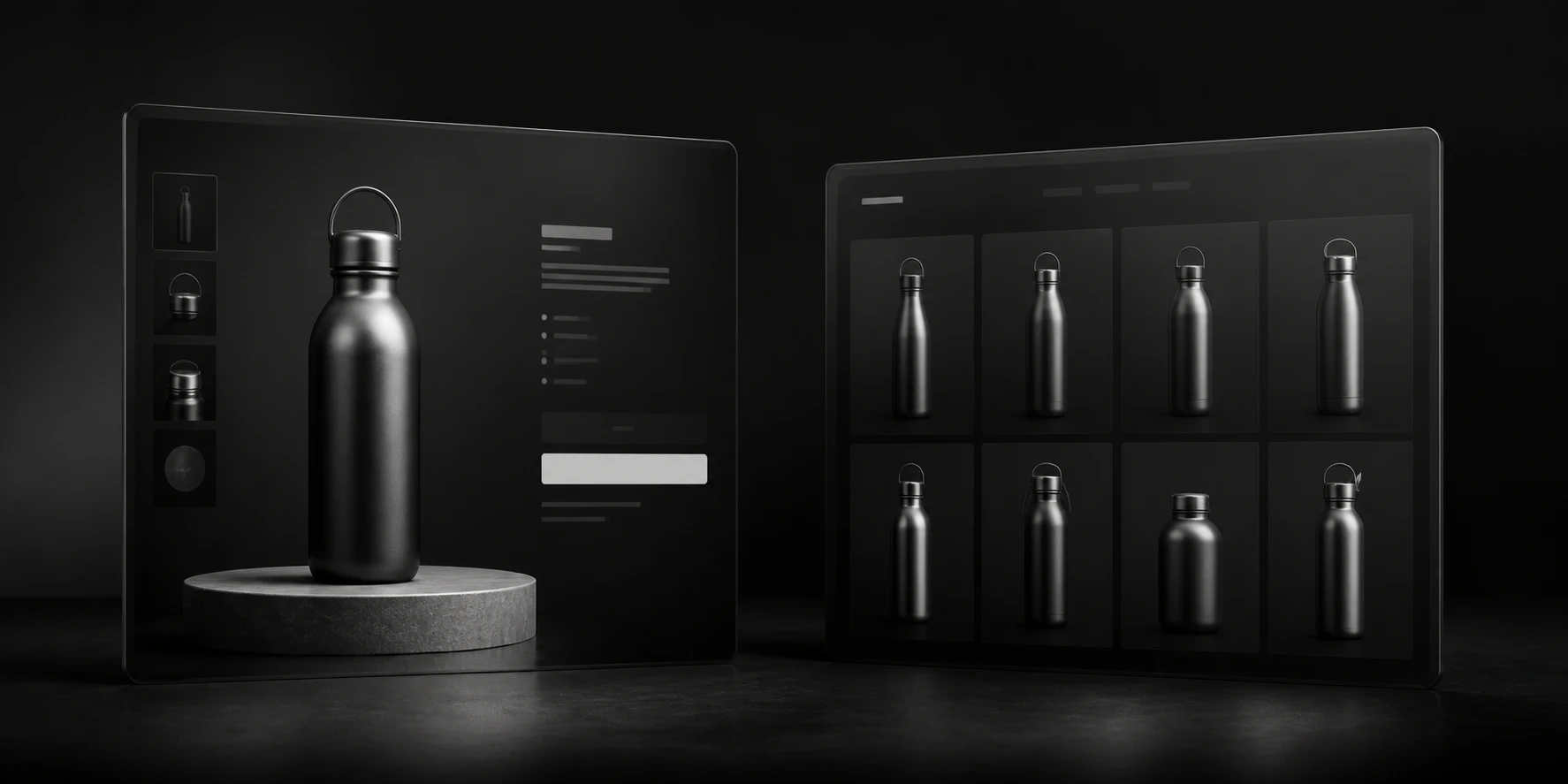
But if titanium water bottles are actually a real part of what you sell, across different sizes, shapes, and designs, that's exactly when a collection page targeting "titanium water bottles" makes sense.
Go narrower still, and the same logic keeps applying. "Large titanium water bottles" might still deserve its own collection page if you've genuinely got more than one product that fits.
But "16 ounce titanium water bottle" might only match one specific product you sell. If that's the case, optimize the product page for it instead of trying to force a collection around a single item.
Then there's a third case entirely: branded, highly specific product searches, like someone searching "Samsung A71 5G." That's a product keyword.
The searcher wants that exact product, and your product page is what should rank for it, not a collection page.
The pattern underneath all of this: as a keyword gets more specific, it tends to move from collection to product.
Always verify against the real inventory you actually have and the real SERP, but that's the starting rule of thumb.
One Page, a Few Closely Related Keywords
Every collection page needs one to three clear target keywords that are all very closely related.
If you target a broad list of unrelated keywords instead, the collection page will typically struggle to rank for any of them.
Your optimization gets diluted across too many different targets, and the page ends up performing weakly across the board.
"Closely related" here specifically means keywords that describe the exact same thing, not just keywords in the same general topic area.
Primary Keywords vs. Secondary Keywords
Once you've settled on what a collection page is really about, it's worth splitting the keywords you found into two tiers.
Your primary keyword (sometimes I just call it the target keyword) is the one you use in every high-leverage spot on the page: the H1, the URL slug, the meta title, the meta description, and front-loaded in the first sentence above the grid.
Your secondary keywords are everything else that turned up in your keyword research that's clearly describing the same thing, just phrased differently.
Sometimes that's a genuine synonym: "kids soccer boots" and "kids soccer cleats" are the same product, just different regional or generational terminology, and one page should target both.
Sometimes it's a close variation your research turns up: "chocolate protein powder," "chocolate-flavored protein powder," "chocolate-tasting protein powder," "protein powder with chocolate flavor." All of these are the same underlying search.
Work secondary keywords naturally into the body content, a subheading here and there, and the below-grid copy.
They don't need the same prominent placement as your primary keyword, but including a few of them is how you end up ranking for a wider spread of the ways people actually search for the same thing.
If the Collection Already Exists: Know What It's Actually For
If you're optimizing a collection that's already live, the first question isn't "what's this getting traffic for right now." It's "what is this page actually for."
If you've already got a clear, existing category page, say a Water Bottles collection, or a Vanilla Protein Powder collection, you already know its purpose.
You know who it's for and roughly what content and keywords should be on it. Build from that clarity, not from a blank slate.
Search Console is still genuinely useful here, just for a narrower job than you might assume: use it to find additional keyword variations the page is already picking up impressions for, and fold the ones that fit back into your content.
Don't treat whatever it happens to be getting clicks for as automatic proof of the page's real purpose. A page can pick up random, low-relevance impressions that have nothing to do with what it's actually meant to serve.
One more thing worth checking on an existing site: not every collection you already have necessarily deserves an SEO purpose at all.
A generic "All Products" collection is the classic example. It can't be tied to any one specific keyword, which means it can't help but cannibalize against your actual, focused collections.
Generally, noindex it and block it in robots.txt rather than leaving it to compete with pages that do have a clear job.
If You're Building a New Collection: Check Search Intent Before Anything Else
For a collection that doesn't exist yet, figure out whether the term you're eyeing even belongs on a collection page at all.
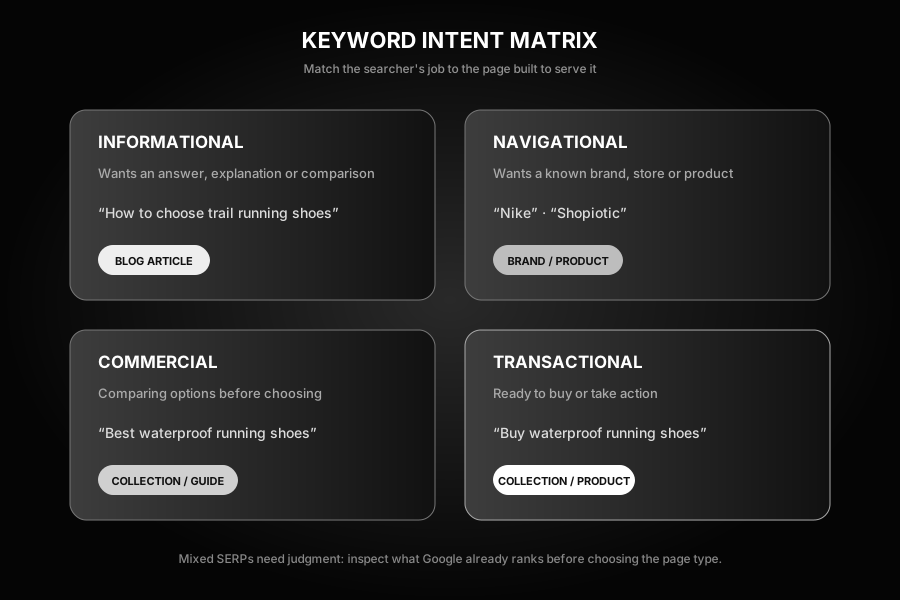
Every keyword falls into one of four intent types:
- Transactional: ready to buy right now.
- Commercial: ready to buy something, hasn't picked a specific product yet.
- Navigational: knows exactly which brand they want. This is usually just a brand-name search, like someone searching "Nike."
- Informational: wants an answer, not a purchase. This is generally best served by a blog post, not a collection page.
Transactional and commercial intent are closely linked in practice, and it's completely normal for a single collection page to serve both at once.
Don't guess which bucket a keyword falls into. Google it, and look at what's actually ranking.
If the top 10 is mostly product and collection pages, that's transactional or commercial intent, and a collection page is a reasonable bet.
If it's mostly blog posts, guides, and forum threads, that's informational, and a collection page won't rank no matter how well you build it.
Sometimes the SERP itself is genuinely mixed, and that's where you need to use a bit of judgment rather than a rigid rule. "Trail running shoes" is a good example: there isn't quite enough context in that phrase alone to know for certain whether the searcher wants to buy a pair or just research the category.
When you see that kind of ambiguity, it's often still safe to target it with a collection page, especially if collection and product results are already appearing on that SERP.
The Subcollection SEO Strategy: Where the Real Money Is
Here's the part of Shopify collection SEO that gets the least attention, and it's genuinely one of the most underused strategies available to a Shopify store.
I'd go further than that, actually. This is where the real money is.
Most Shopify stores are sitting on a pile of gold, right underneath them, and they don't even know it's there.
Most brands think about their collections far too narrowly. One collection for "running shoes." Maybe a men's and women's split. That's it.
Meanwhile the brand competing for the exact same customer has built out thirty or forty collections covering every real way a shopper actually searches.
Walking Through the Actual Process, Step by Step
I want to show you the real process here, not just describe it, because seeing it worked through end to end makes it much easier to actually go do it yourself.
I'll use a real example: a disc golf store I did this exact process for recently.
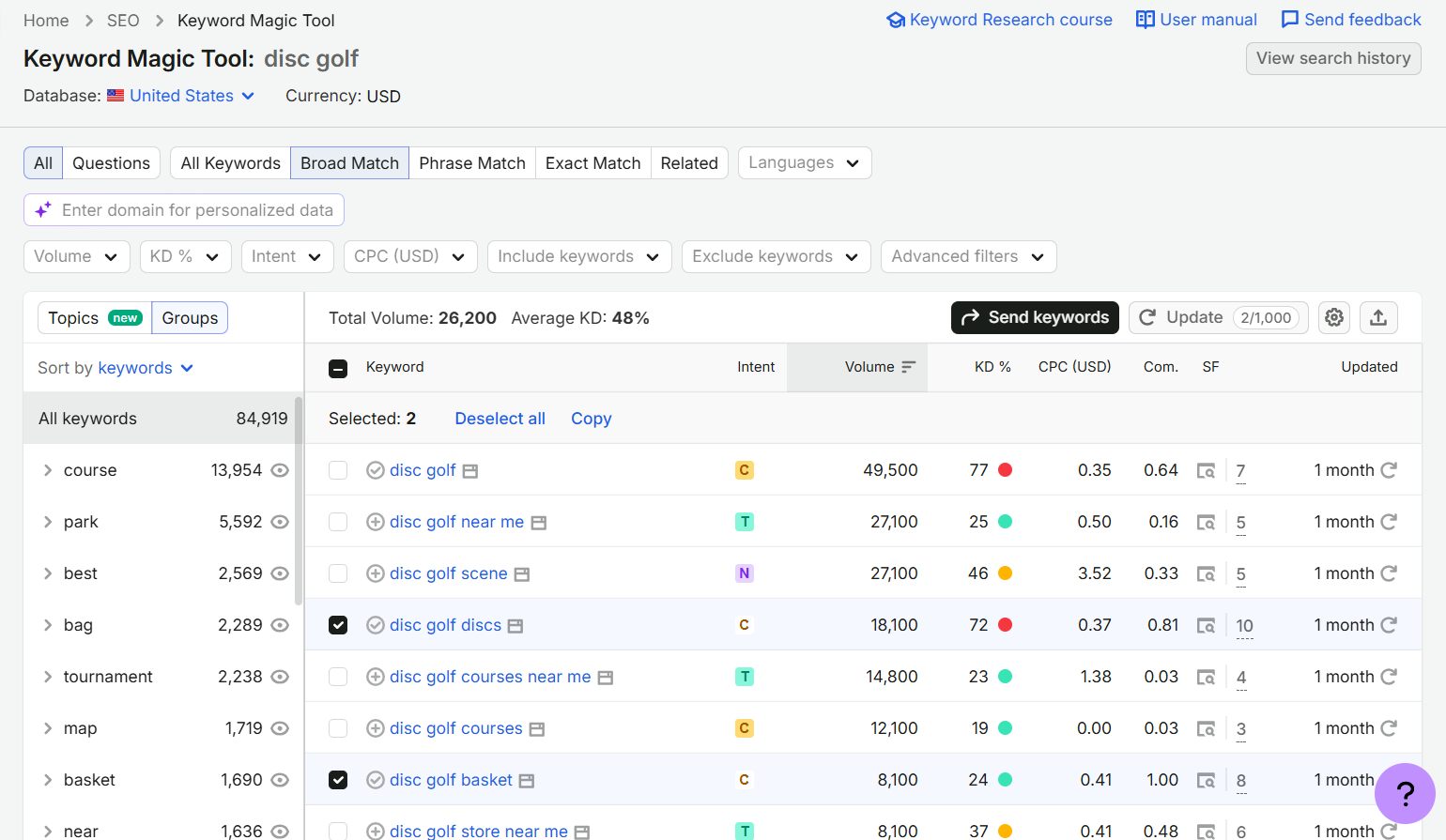
Step 1: start with a seed keyword. Open SEMrush's Keyword Magic Tool and type in the simplest, broadest version of a keyword you can think of for your niche.
For a disc golf store, that's just "disc golf." If you sold shoes, you'd start with "shoe." If you sold protein powder, you'd start with "protein powder."
You're looking for one good seed term that everything else in your catalog realistically branches off from (you might need more than one if your store spans genuinely separate niches).
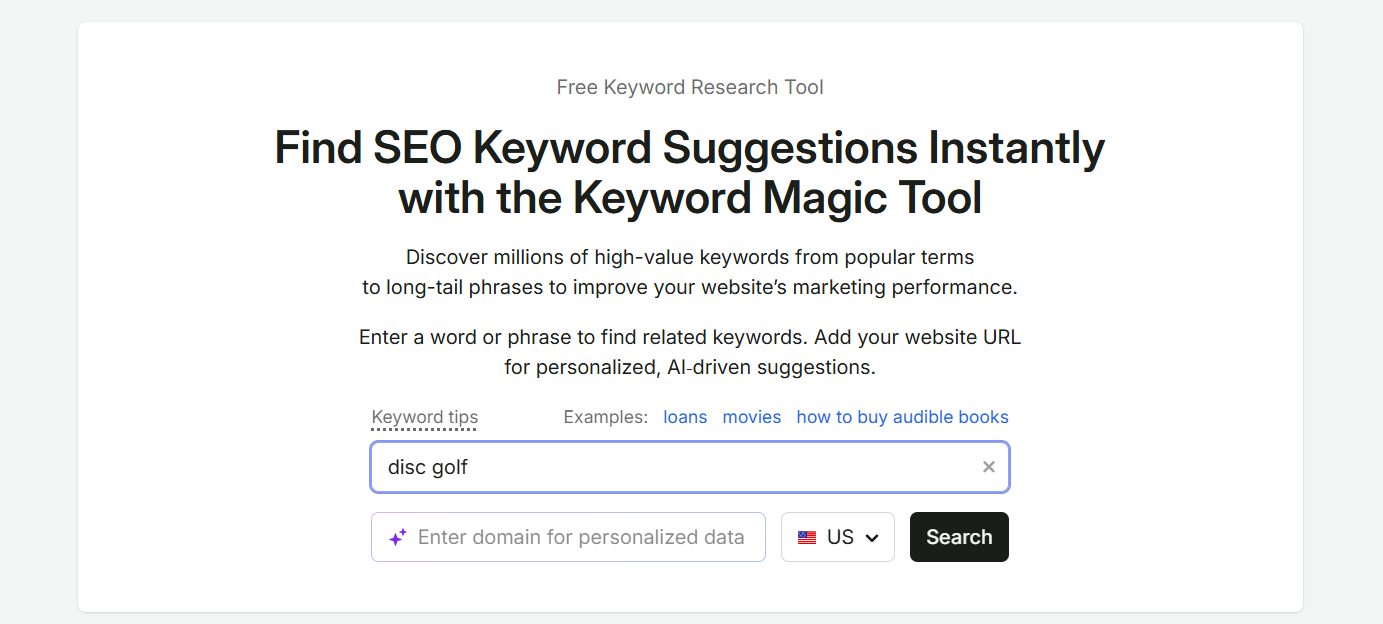
Step 2: scan for anything that could be its own collection. Set the match type to Broad Match, and go through the results looking for anything that reads like a genuine, separate product category.
For disc golf, "disc golf" itself carries 49,500 monthly searches, and the broad match list underneath it turned up real, separately-collectable terms like disc golf discs (18,100/month), disc golf basket (8,100/month), disc golf bags, disc golf carts, and more, right in the first few screens.
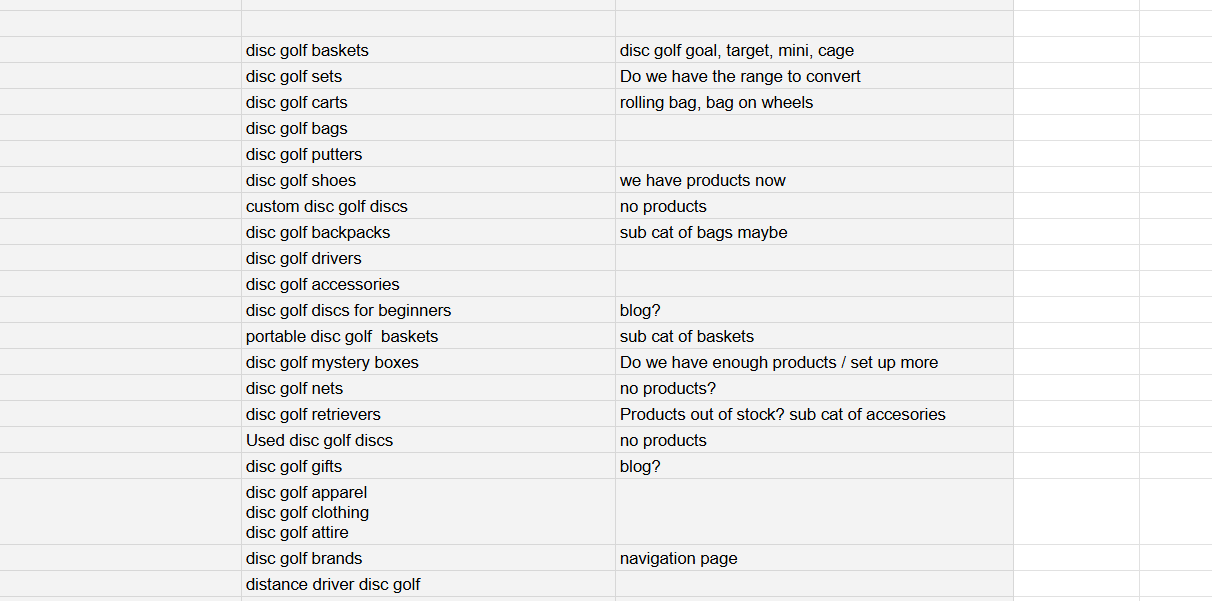
Step 3: log every candidate in a collection strategy sheet. I keep a running Google Sheet for this.
Every time I spot a keyword that could plausibly be its own collection, it goes in, along with a quick note on my actual thinking at the time, including honest open questions about whether the inventory backs it up yet.
This is also where you catch synonym keywords worth grouping together rather than treating as separate collections: disc golf apparel, disc golf clothing, and disc golf attire are all the same thing, so they got grouped as one candidate, not three.
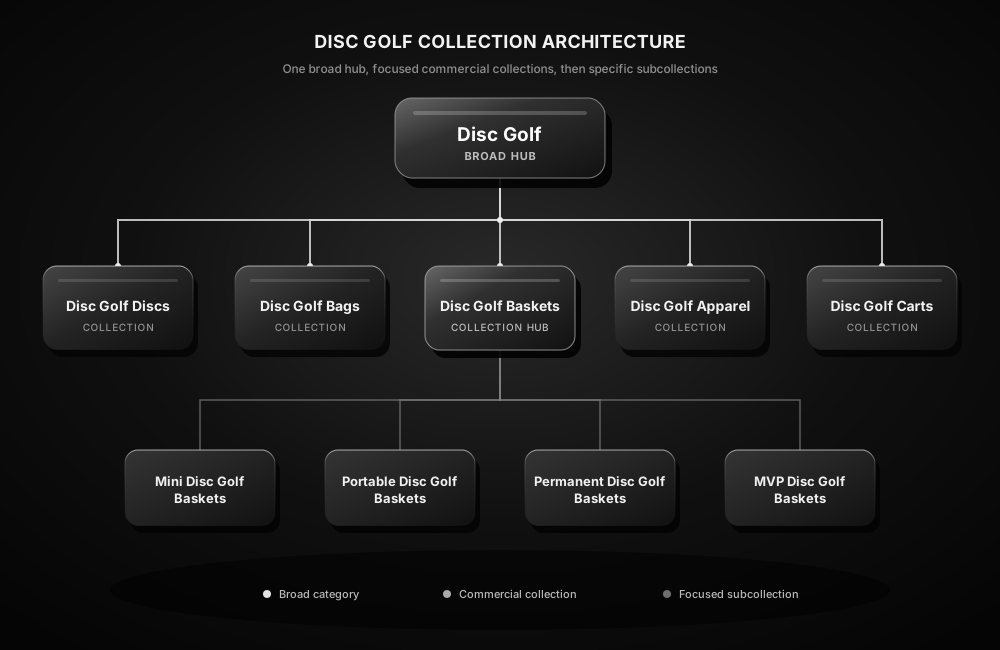
Step 4: map the survivors into hubs and subcollections. On a second tab, take the candidates that actually match real inventory and real search intent, and start organizing them into a hub-and-subcollection structure.
For disc golf baskets specifically, that hub broke down into mini disc golf baskets, permanent disc golf baskets, portable disc golf baskets, and MVP disc golf baskets, each becoming its own collection page underneath the broader "disc golf baskets" hub.
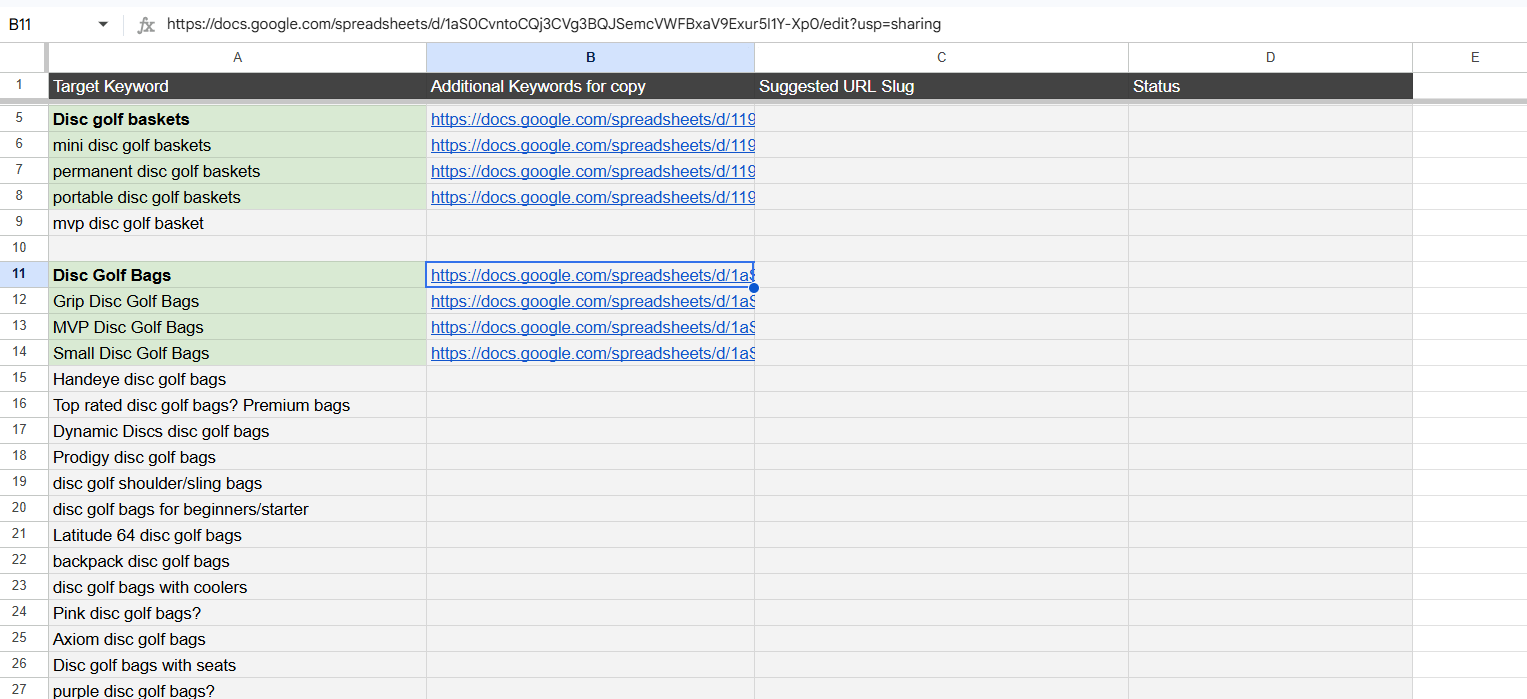
The same mapping tab covered other hubs the same way. "Disc Golf Bags" broke down into its own set of subcollections: Grip, MVP, Small, and more, each with a link out to that specific subcollection's own deep-dive keyword sheet once the research was done.
Step 5: do a full, dedicated keyword research pass for each individual page. This is the step people skip, and it's where a lot of real volume hides.
Once you know you're building a "mini disc golf baskets" page, go back into the keyword research tool and search modifiers around it: "mini," "small," and similar. You're looking for every real variation of the same underlying search, not just the one exact phrase.
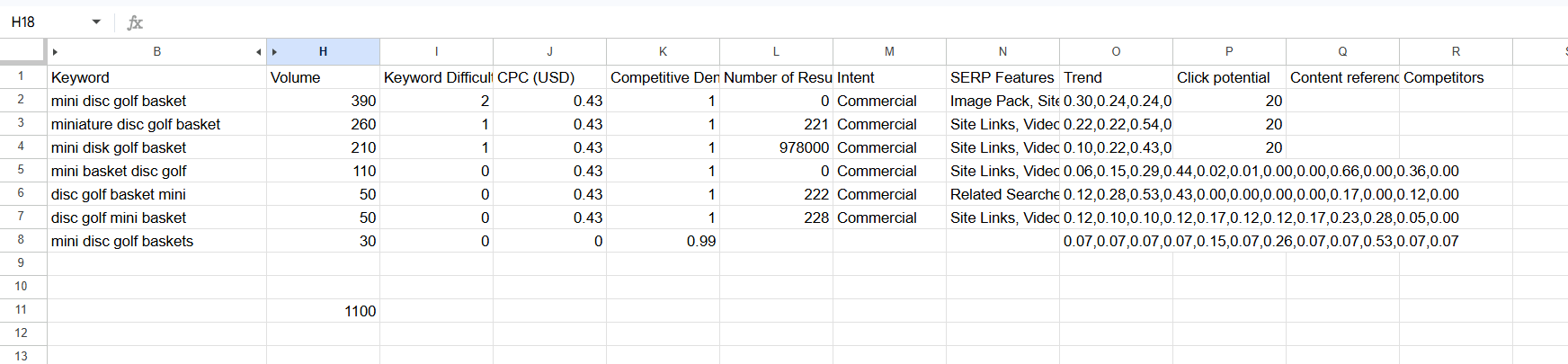
For mini disc golf baskets specifically, that search turned up 7 real keyword variations totaling 1,100 monthly searches combined: mini disc golf basket, miniature disc golf basket, mini basket disc golf, disc golf basket mini, mini disc golf, and mini disc golf baskets, among others.
Targeting just "mini disc golf basket" alone would have captured only 390 of that 1,100.
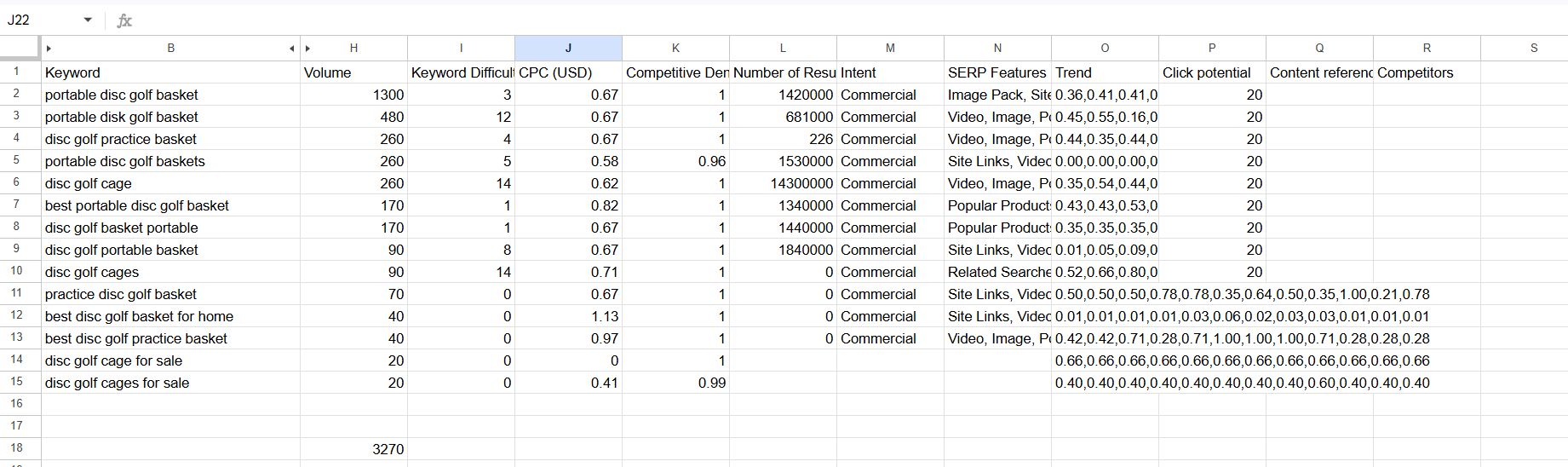
Portable disc golf baskets worked the same way: portable disc golf basket, portable disc golf baskets, disc golf practice basket, practice disc golf basket, best portable disc golf basket, disc golf basket portable, disc golf portable basket, and best disc golf basket for home, adding up to roughly 3,270 monthly searches across the group.
If you know your niche well, you'll be able to read the real intent behind an ambiguous term like that better than any tool can tell you.
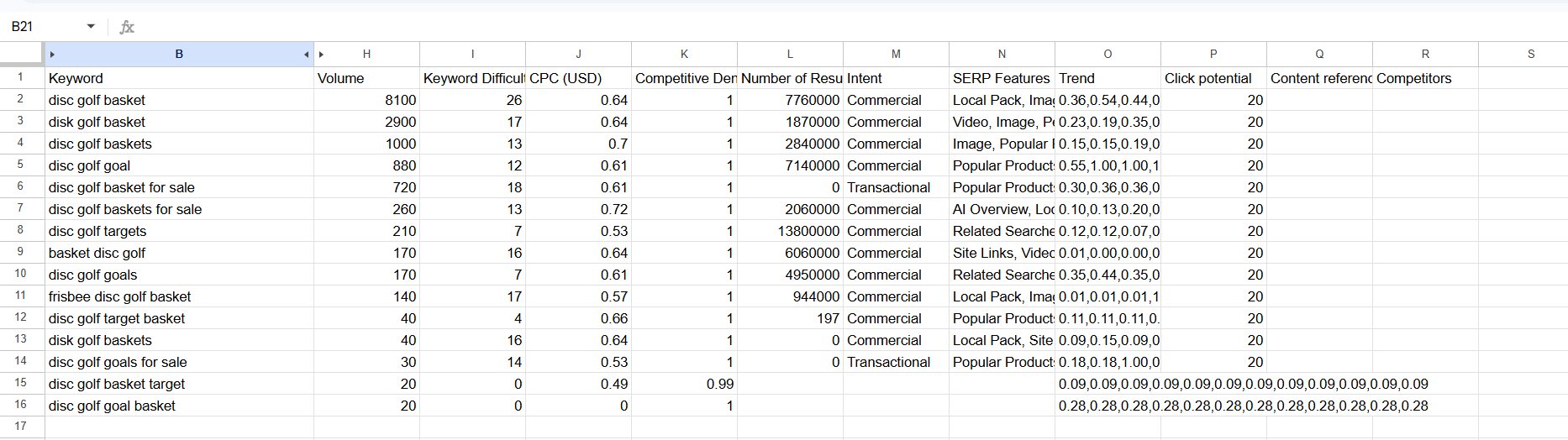
The hub page itself turned up a different kind of variation: real synonyms rather than close phrasings, and a genuinely surprising amount of total volume once you add it all up.
"Disc golf basket" (singular) alone carries 8,100 monthly searches, well ahead of "disc golf baskets" (plural) at 1,000.
Add in "disc golf goal" (880), "disc golf basket for sale" (720), "disc golf baskets for sale" (260), "disc golf targets" (210), "basket disc golf" (170), "disc golf goals" (170), and "frisbee disc golf basket" (140), and the full hub opportunity comes out to somewhere around 14,700 monthly searches once every real variation is counted, not the 1,000 you'd see if you only checked the plural phrase.
The target keyword for that hub page is "disc golf basket," since that's the clear primary term by volume, but "disc golf targets" is worth working naturally into the body copy, and "disc golf goals" fits better in a sentence than in a heading, since it's slightly incorrect terminology that still shows up in real searches.
That's the full process, start to finish: find a seed keyword, scan broad match results for standalone-collection candidates, log everything into a strategy sheet with synonym groupings, map the survivors into hubs and subcollections, then do a dedicated, modifier-driven keyword research pass on each individual page once you know exactly what you're building.
Moneyball SEO
This approach has a name in the SEO world: Moneyball SEO, a term coined by Kai Cromwell, one of the best Shopify SEOs working today.
It's a reference to the real story behind the term "Moneyball": the Oakland Athletics built a genuinely competitive baseball team by rostering a large number of solid, undervalued players instead of trying to outbid richer teams for a handful of expensive superstars.
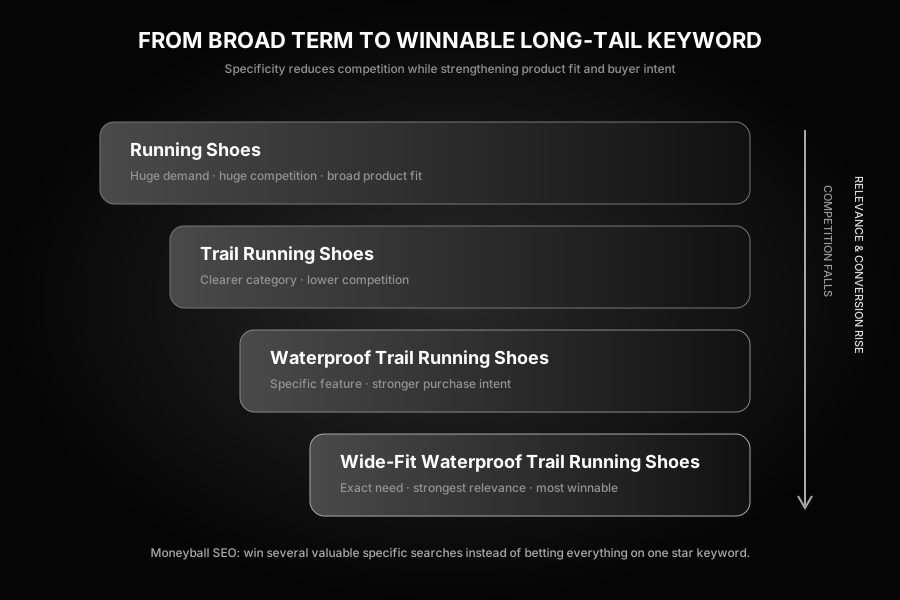
The SEO version works the same way. You probably can't afford the "star player" keyword, the single huge, obvious, brutally competitive head term everyone's already fighting over.
So instead of chasing it directly, you break it into every realistic longer-tail variant and go after the combined opportunity instead.
Four Frameworks for Generating Subcollection Ideas
- Obvious attributes. Color, size, material, gender, style. Hoodies become black hoodies, oversized hoodies, men's hoodies, graphic hoodies.
- Features. A specific spec or capability worth its own audience. 240 volt versus 120 volt heating cable. Warm white versus cool white LED strips.
- Use case and intent. What is the customer actually trying to do? Protein powder becomes protein powder for weight loss, for muscle gain, for women.
- Brand, if you're a reseller. If you carry multiple manufacturers rather than selling your own single-brand line, brand itself is a real subcollection dimension. Adidas running shoes and Nike running shoes are genuinely different searches. So are Discraft disc golf discs and Discmania disc golf discs.
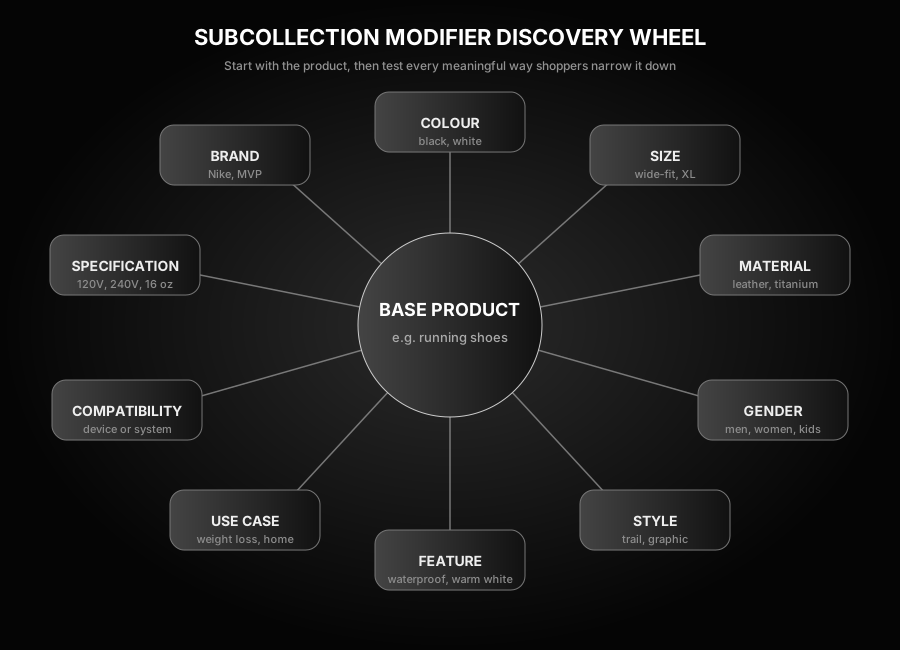
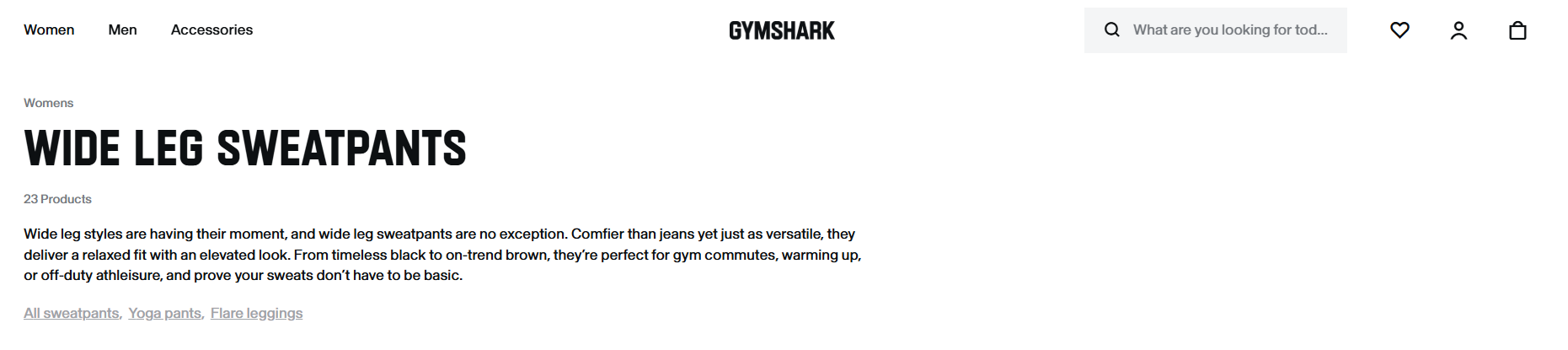
You don't need to take my word for how far this scales either. Gymshark, a genuinely massive apparel brand, runs its entire bottoms category through exactly this kind of subcollection tree: Wide Leg Joggers, Straight Leg Joggers, Oversized Joggers, Jogger Shorts, and Tracksuits all exist as separate, specific collections rather than one generic "Joggers" page.

Its "Wide Leg Sweatpants" collection specifically carries 23 products, real front-loaded intro copy, and its own related-collections links to All Sweatpants, Yoga Pants, and Flare Leggings, the same pipe-style internal linking covered later in this guide.
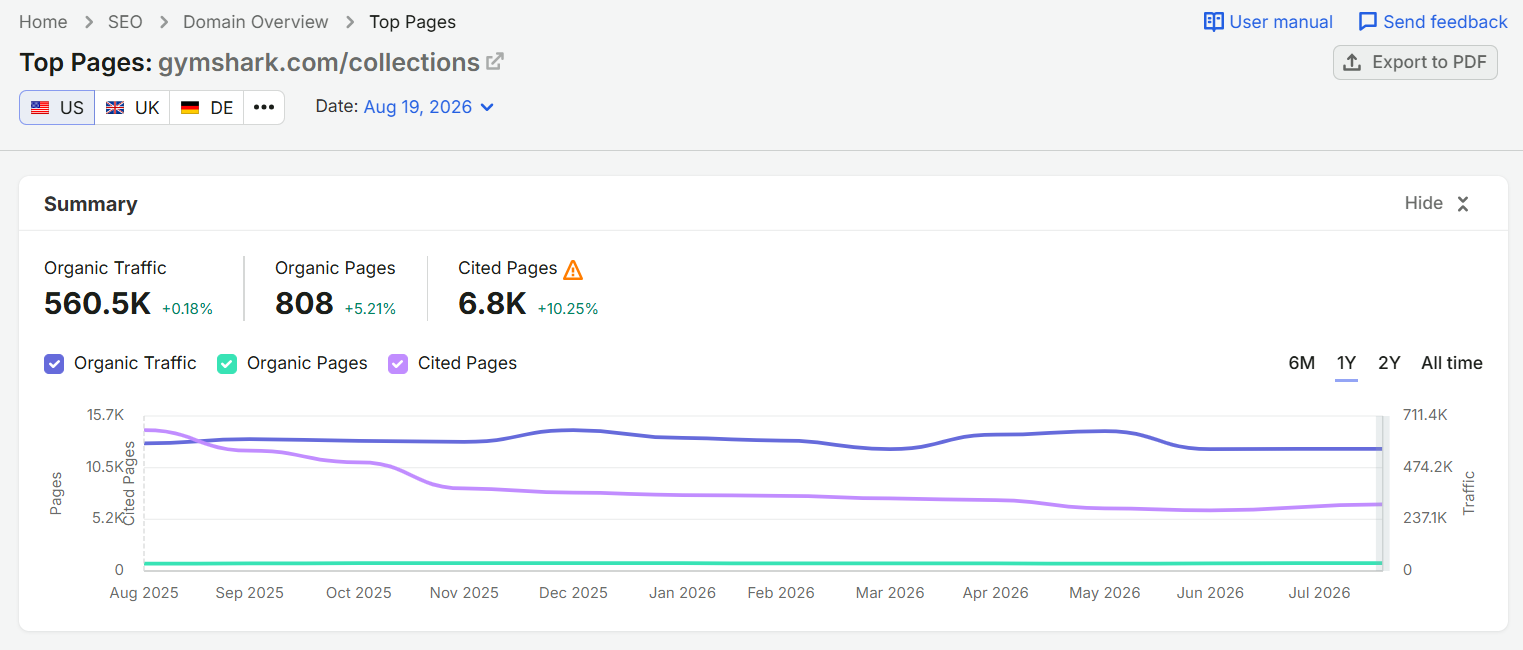
Pull up SEMrush's Top Pages report for gymshark.com/collections specifically, and the scale of this becomes obvious: 560.5K in organic traffic across 808 organic collection pages.
Filter the full page list down to just /collections/ URLs, and you can see exactly which specific long-tail collections are doing the work: /collections/matching-sets/womens alone pulls 54.5K in traffic across 1.3K ranking keywords, /collections/leggings/womens pulls 33.5K, /collections/bags pulls 22.2K, /collections/shorts/mens pulls 21.8K, /collections/t-shirts-tops/womens pulls 17.7K, and the list goes on for hundreds more rows.
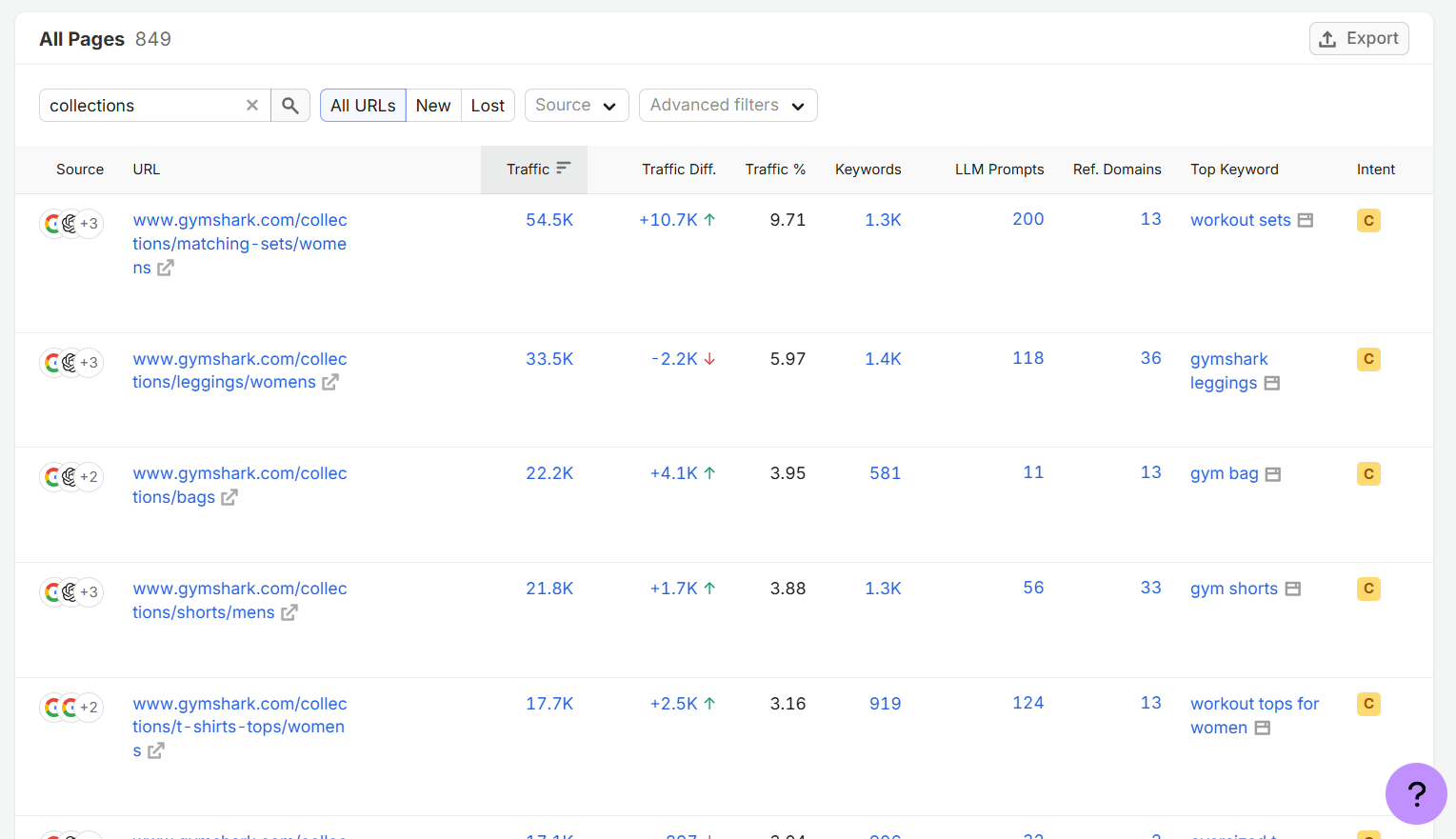
Even for a brand this size, with all the direct brand-search traffic and backlink authority that comes with it, that traffic isn't happening by accident. Moneyball SEO likely generates millions of dollars in non-branded organic revenue for Gymshark each year.
Take a real example closer to home too, from Shopiotic's own client base. Prolux Materials sells underfloor heating systems.
"Underfloor heating" alone is a broad, competitive term. But underneath it sits a whole tree of realistic, buildable subcollections: heated bathroom flooring, heated tile flooring for small bathrooms, electric underfloor heating for kitchens, snow-melting driveway systems.
Each one individually has lower volume and lower competition than the head term.
Stacked together, their combined traffic can rival or beat it, and they typically rank in weeks or months instead of the year-plus a head term can take from a standing start.
Before we started working with Prolux, they had somewhere around 4 or 5 collection pages total.
Today they have roughly 25, built almost entirely from the same underlying products they already had (they've added a handful of new products since, but the bulk of that growth came from restructuring what they already sold into far more specific, better-targeted collections).
Here's what the same pattern looks like worked through for a running shoe brand, going from one broad collection to a realistic subcollection tree:
| Level | Example collection | Why it works |
|---|---|---|
| Broad term (hard to win fast) | Running Shoes | Huge volume, huge competition, realistically 12+ months to have a shot |
| Subcollection (attribute) | Trail Running Shoes | Narrower audience, meaningfully lower competition, still real volume |
| Subcollection (use case) | Running Shoes for Plantar Fasciitis | Small volume alone, but near-zero competition and high buyer intent |
| Sub-subcollection (stacked) | Trail Running Shoes for Wide Feet | Very specific, converts at a higher rate, ranks in weeks not months |
A quick, useful rule of thumb to remember here: roughly 75% of clicks on a search results page go to positions one through three.
Ranking seventh for a 50,000-search broad term can produce less real traffic than ranking second for a 500-search long-tail variant. "We rank on page one" isn't a meaningful claim on its own.
Position is what matters, and subcollections are how a smaller brand wins real position faster.
An Important Boundary: You're Multiplying Collections, Not Products
This is a collection-multiplying strategy, not a product-duplicating one.
The same SKUs stay under the same stable product URLs the whole time. Only the collections around them get repackaged and multiplied.
Take that running shoe example again. You might sell the exact same physical pair of trail running shoes in a wide-fit version.
That one product doesn't need three separate listings to match "running shoes," "trail running shoes," and "trail running shoes for wide feet." It just needs to exist once, as a real product, and then get pulled into all three collections through your collection's product rules.
The multiplication happens at the collection level, sorting and re-presenting the same catalog in more specific, more findable ways, not at the product level.
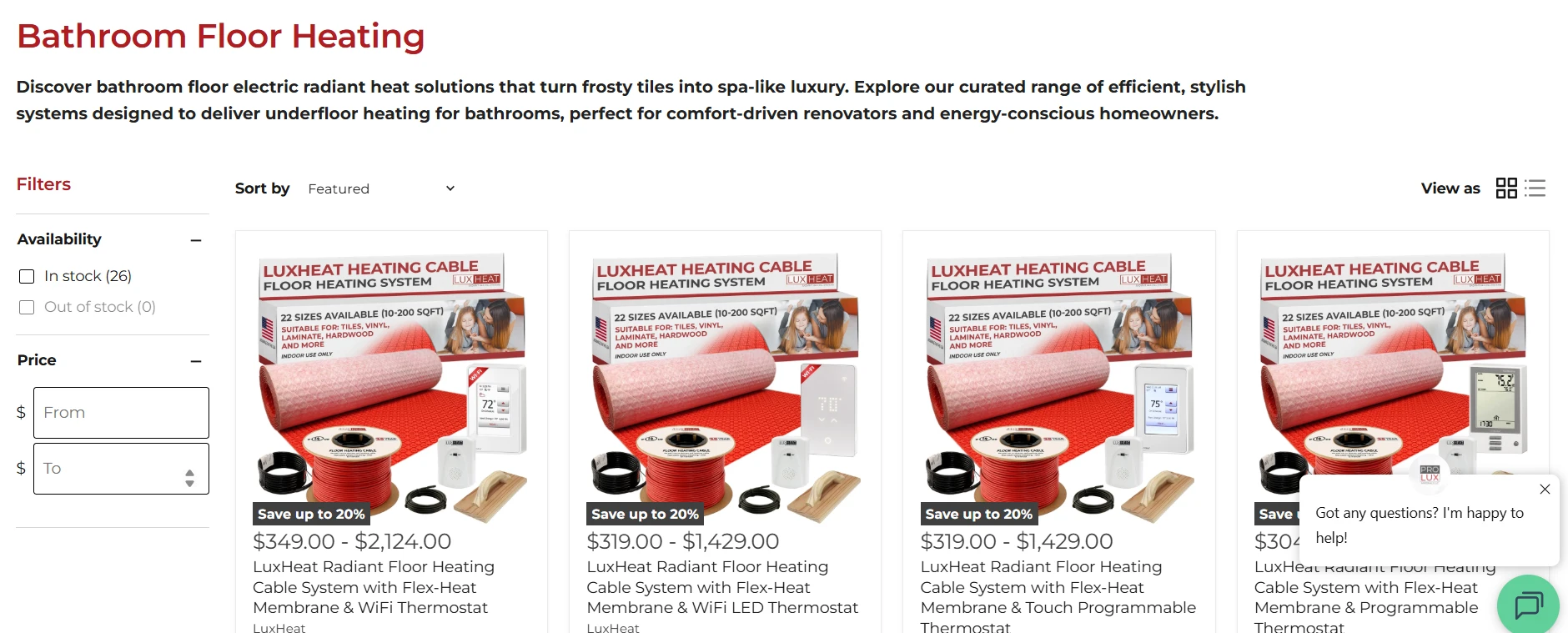
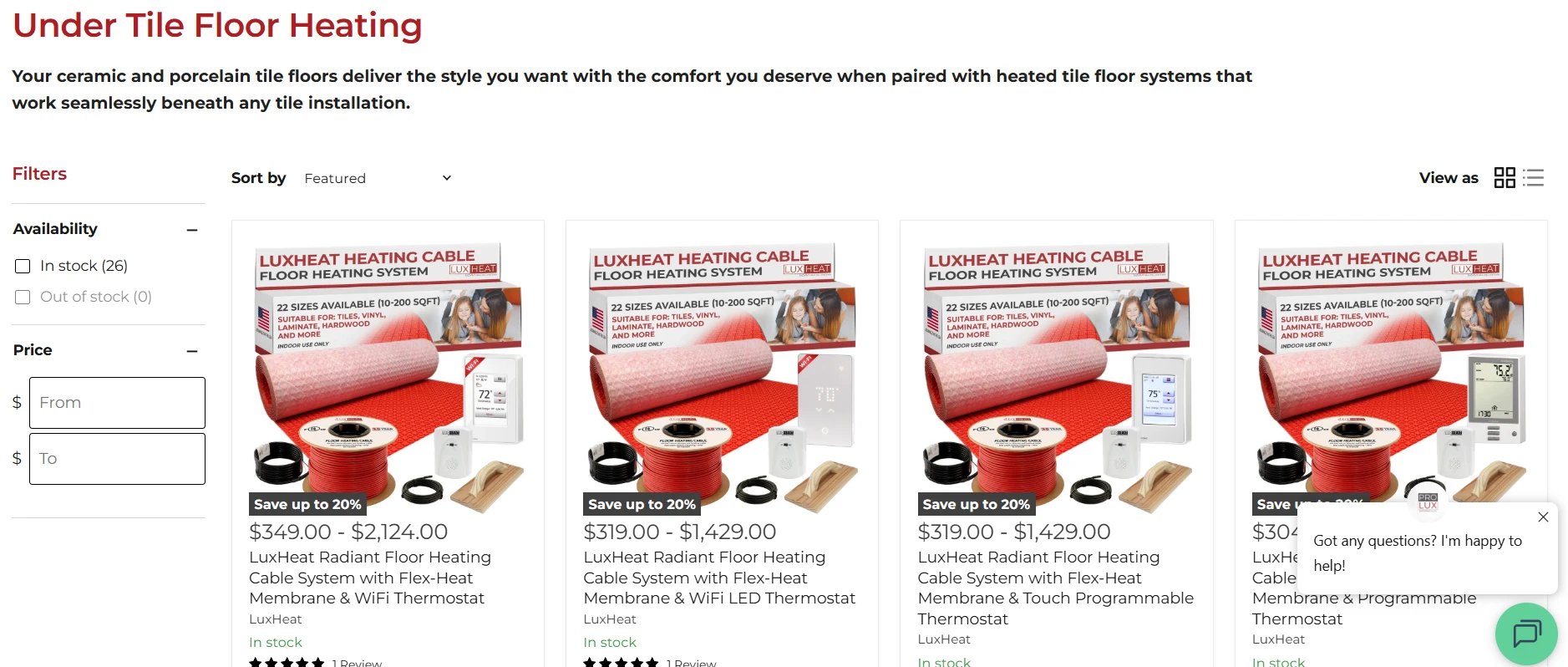
A real example of this from Prolux Materials: the exact same LuxHeat heating cable kit shows up on both the "Bathroom Floor Heating" collection and the "Under Tile Floor Heating" collection, same product images, same listings, just organized under two different, specific, keyword-targeted categories.
Pillar Two: Building the Collection Page Itself
Once you know the keyword, the next question is how to actually structure the page around it.
Shopify has a real, specific limitation worth understanding before you start.
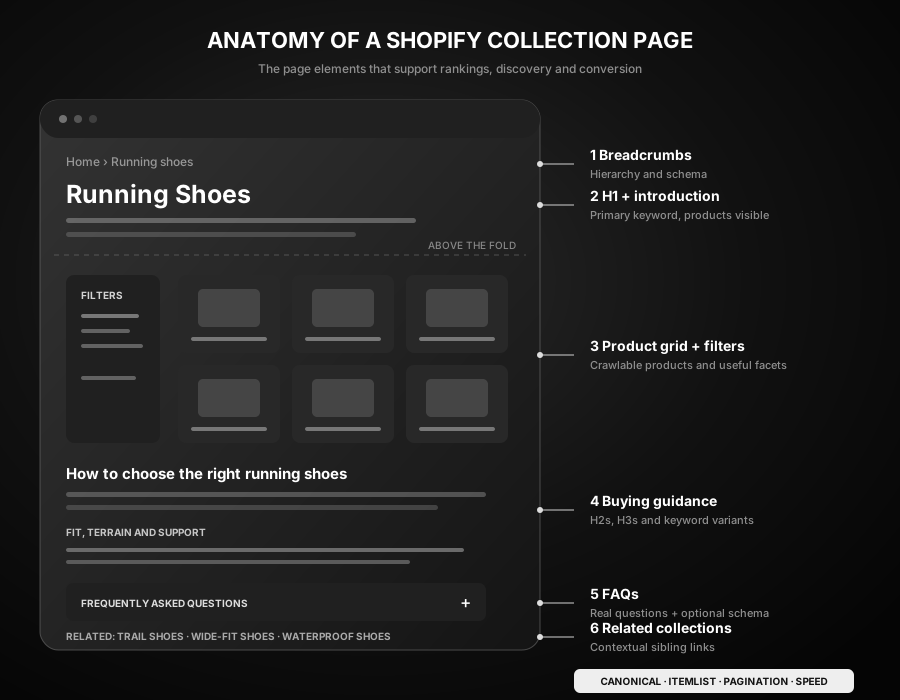
Shopify's Flat URL Structure, Honestly
Shopify doesn't support true nested subcategory URLs. You're locked into a flat /collections/x and /products/y structure.
You can't natively build something like /sofas/leather/, only /collections/leather-sofas.
That's a genuine platform limitation, not a workaround you're missing.
The practical fix isn't to fight the URL structure. It's to make each subcollection its own standalone collection page instead of trying to nest it, and let internal linking (covered in the next section) carry the hierarchy that the URL itself can't express.
The Minimum Viable Collection
You need at least 2 products for a collection to be worth building as its own page.
If you've only got one product that matches a given keyword, you're usually better off targeting that keyword directly with the product page itself, and reinforcing it with internal links from elsewhere on your site using that keyword as the anchor text, rather than forcing a one-product collection into existence.
Fewer than that, and it reads as thin content, both to Google and to a human landing on it.
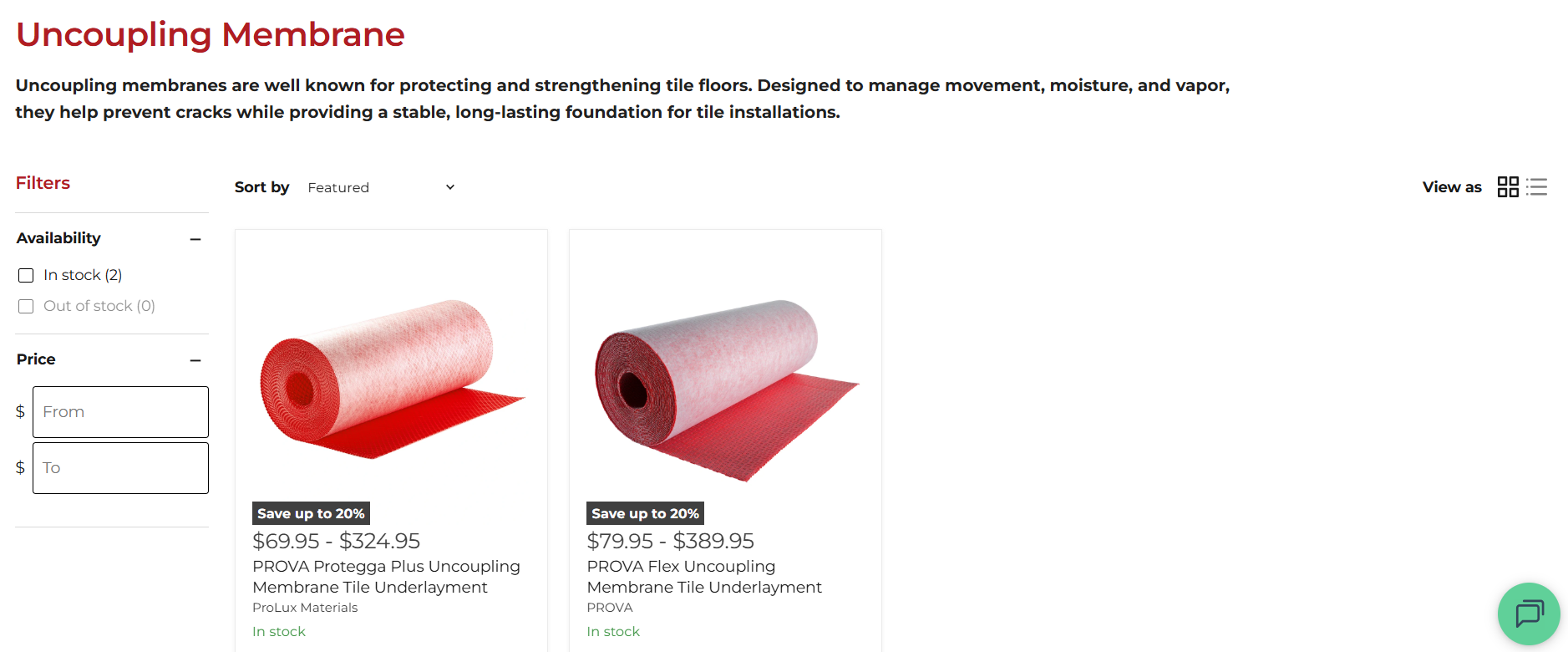
Two is a genuine floor, not just a theoretical one. Prolux Materials' "Uncoupling Membrane" collection carries exactly 2 products, and it still ranks for multiple real, high-volume keywords.
A quick diagnostic if you want to check your own site for empty or near-empty collections: search site:yourstore.com "This collection is empty" OR "There are no products".
Design: Don't Bury the Grid
A collection page that ranks needs three things working together, and none of them substitute for the others: design (a layout that doesn't bury products), content (real, differentiated text), and site structure (the page is actually reachable, which I'll cover in the internal linking section).
On the design side, the sharpest, most tested guidance is also the simplest: don't default to a banner image above the product grid unless it earns its place.
A banner isn't automatically a problem. But it needs a real reason to be there, not just habit or brand aesthetic.
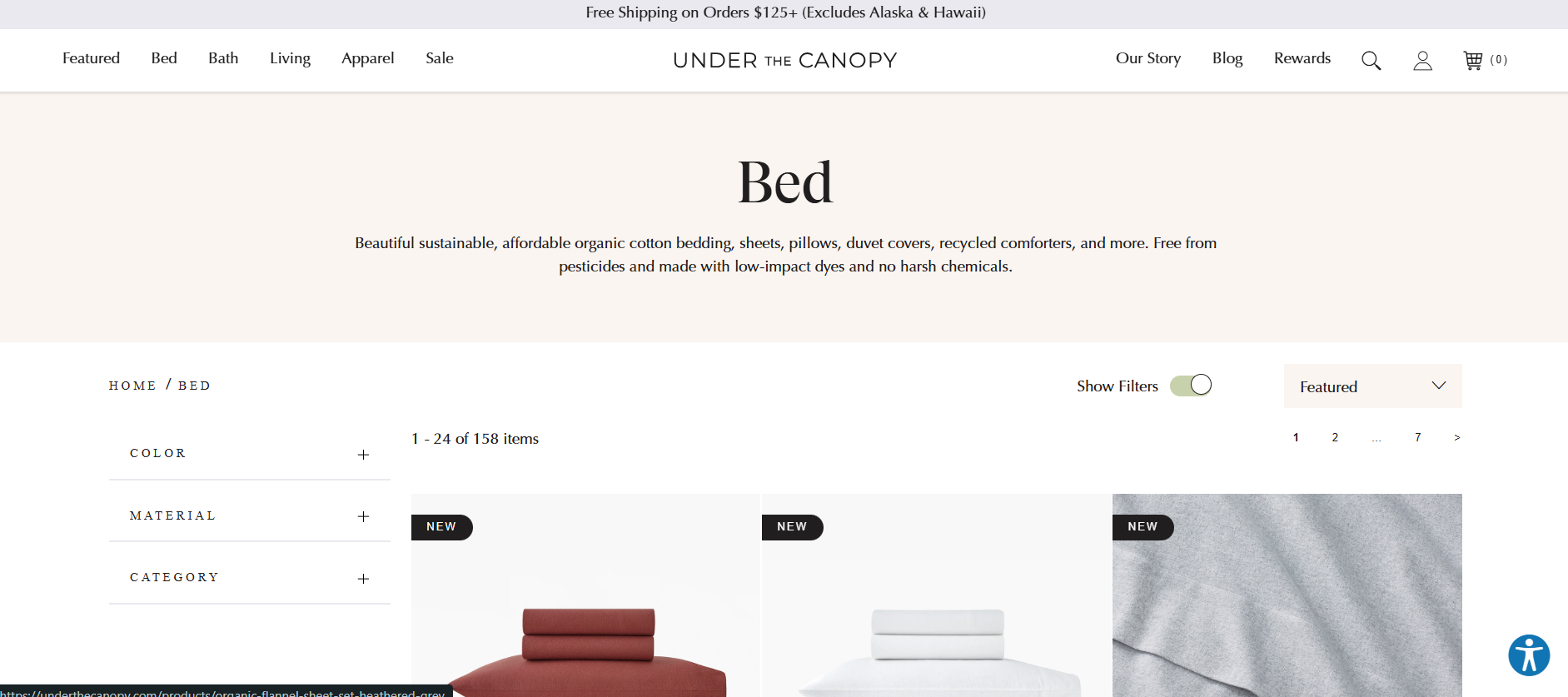
On mobile especially, a hero image plus 50 to 100 words of intro copy pushes the actual products below the fold, and a visitor who searched a transactional term wants to see products immediately, not scroll past marketing first.
One option that gets you both: design the banner so your H1 and intro copy sit directly on top of the image, as long as it stays genuinely readable.
That way you keep the visual impact without adding extra vertical space before the grid.
One real case study, from Kai Cromwell's agency, makes the underlying point concrete. A nine-figure Shopify brand had a well-designed collection template, but its short descriptive copy sat hidden at the bottom of the page behind an accordion, purely for aesthetic reasons.
Moving that same one or two sentence intro from the buried accordion to a visible spot above the grid, with literally nothing else about the page changed, produced a roughly 5-position average ranking improvement within a day.
Clicks rose 35%, and impressions rose 25%, holding over the following two and a half months.
If a client pushes back on adding visible copy above the grid for aesthetic reasons, here's the honest answer worth having ready: one or two well-written sentences are not what tanks a page's conversion rate.
If a page is genuinely converting poorly, the cause is almost always the product, the reviews, the pricing, or the offer, not a couple of introductory sentences.
Pillar Three: Content and Keyword Placement
With the page structure in place, here's what actually needs to go on it, and where.
This is the part of shopify collection pages SEO optimization that most directly affects whether Google understands the page at all, so it's worth getting right before moving on to linking and backlinks.
Above the Grid
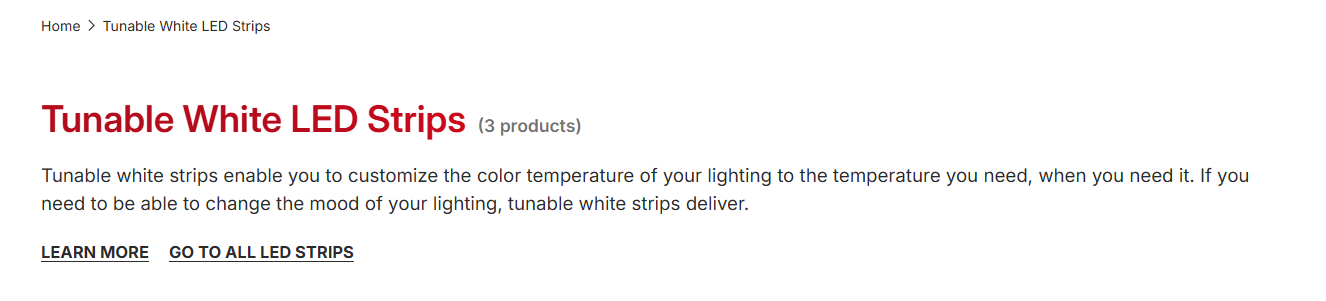
H1 equals the plain target keyword. Not a clever rewrite.
"Trail Running Shoes," not "Adventure-Ready Footwear."
Google matches literally, and a creative H1 just makes the page's relevance to the query harder for Google to confirm at a glance.
Above the product grid, keep it short: roughly 50 to 100 words, front-loading the target keyword at the very start of the first sentence.
Some teams have started thinking about this in characters instead of words, aiming for around 150 to 160 characters specifically.
Character count controls how many lines of text actually display on mobile more precisely than word count alone.
Below the Grid
This is where the real content lives, and it's the part most default Shopify themes leave completely empty.
Our own real spec for client collection pages: 2 to 3 sentences, around 50 words, above the grid, and 400 to 500 words below it, covering genuine differentiators, buying guidance, and (if there's real value in it) a short FAQ block.
There's no single universal number here though. The more reliable benchmark is whatever's actually ranking for your specific target keyword right now.
Open the top 3 results and check their real word count, structure, and depth.
A fashion-adjacent keyword might show you 200 words is genuinely plenty. A more technical or considered-purchase category might show you 900 or more is what it actually takes to compete.
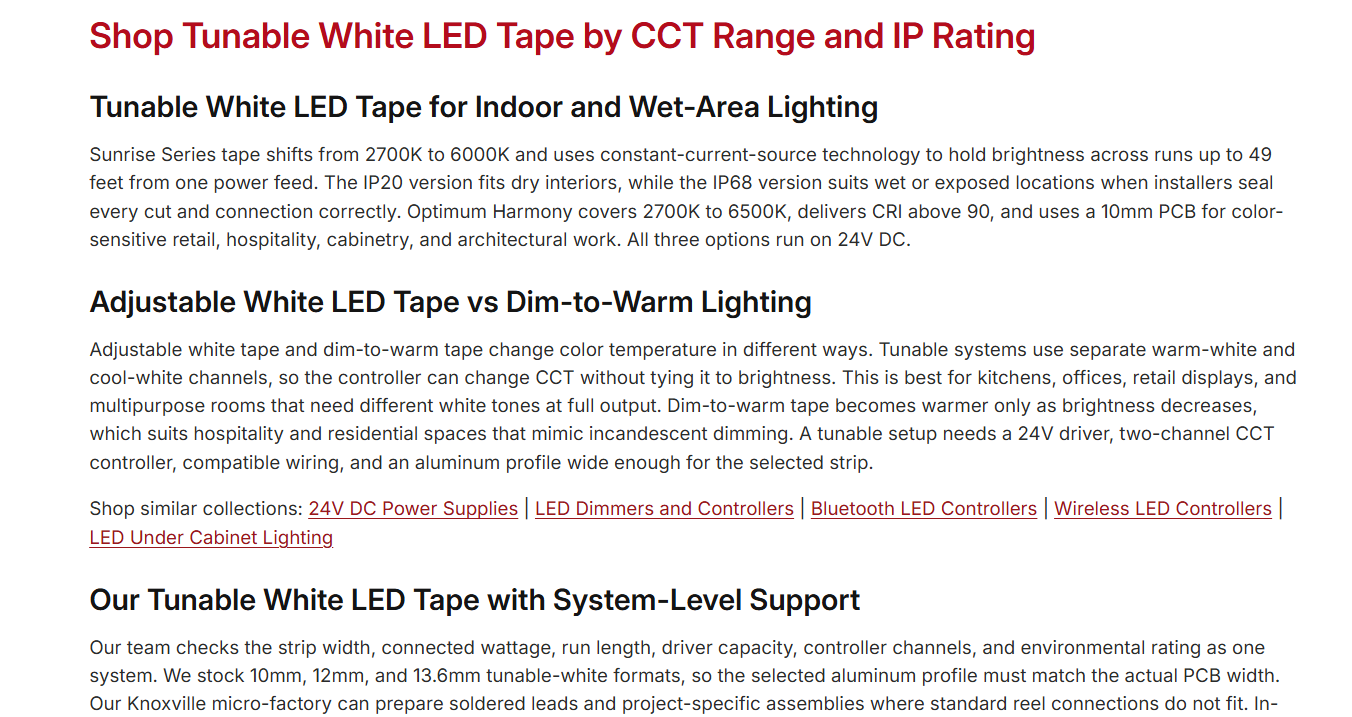
Structure the below-grid content as one H2 (an inverse phrasing of your target keyword works well: target keyword "men's running shoes" becomes H2 "Running Shoes for Men"), followed by 2 to 4 H3s.
Each H3 should cover one genuine, specific point about that exact collection, not generic filler that could apply to any category on any store.
One category needs real extra care here: anything that touches your money or your life. Health, medical, food, supplements, skincare, anything applied to or ingested by the body.
These niches typically need more content to rank, not less: more proof, more real expertise signals, more topical authority built up around the category, not just on the one page. If your niche falls into that bucket, go in expecting to need meaningfully more than the general baseline above, and verify that against what's actually ranking before assuming a shorter page will compete.
More Content Isn't Automatically Better
It's worth saying this directly, because it cuts against the instinct to just add more words.
Extra content that doesn't match what a buyer is actually looking for can hurt a collection page more than help it.
Content on collection pages is important. Don't have too much, but do have some. Position tracking will help you find the sweet spot.
Two real collection pages I worked on had over 1,000 words of content each, but it read like a blog post stapled onto a category page.
Headings phrased as how-to questions. Images breaking up the text throughout. Keywords worked in independent of actual buyer intent.
The fix was almost entirely subtractive. Keyword research to build a focused, commercial-intent-only target list. Rewritten meta title and description around those keywords.
The old content and images removed entirely, replaced with just 500 words of conversion-focused copy. Three to five internal links added to other relevant collections.
Then SEMrush position tracking set up to actually measure what happened.
Real results: one collection's average position moved from around 14.5 to 7. The other moved from around 7.5 to 3.
The lesson isn't "less is always better" any more than it's "more is always better."
It's that the SERP itself, not a fixed word-count rule in either direction, is what tells you where the sweet spot actually sits for your specific keyword.
Getting Both an Intro and a Longer Description on One Collection
Here's the practical tension: you want a short, scannable intro above the grid, and several hundred words of real content below it, but Shopify only gives you a single description field per collection by default.
The way we actually solve this at Shopiotic: set up a collection metafield with the type "rich text," and use it to power a dedicated rich text section below the product grid. This is a genuine no-code setup, entirely through Shopify's theme editor and admin settings, no Liquid required.
From there, the standard collection description field is used purely for your short above-grid intro, and the metafield holds your longer below-grid content, fully rich text, so it supports real headings, links, and formatting rather than being squeezed into one plain field.
Here's the actual setup, step by step.
Step 1: create a new template, rather than editing the default one. In the theme editor, open the page picker and choose Collections.
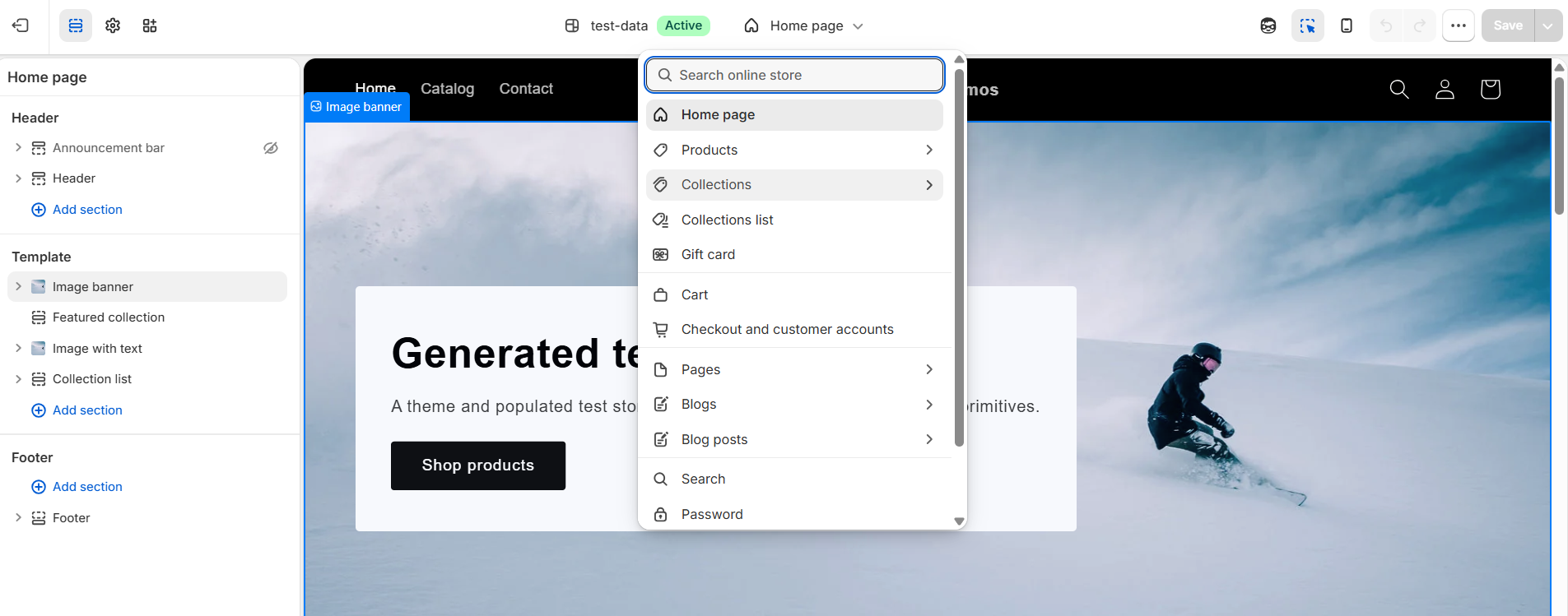
Select "Default collection," then click "+ Create template." Creating a new template means this change only applies to collections you deliberately assign it to, rather than altering the layout every collection on the store already uses.
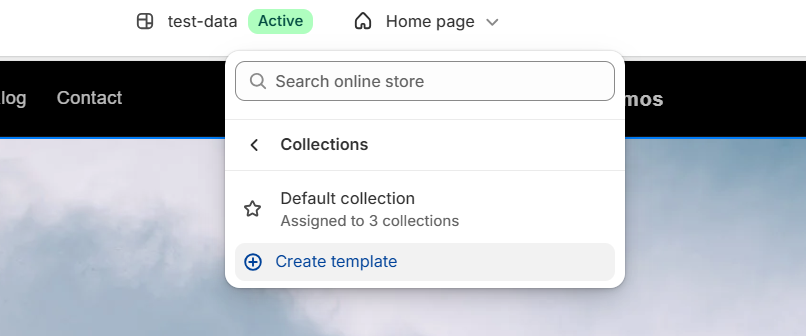
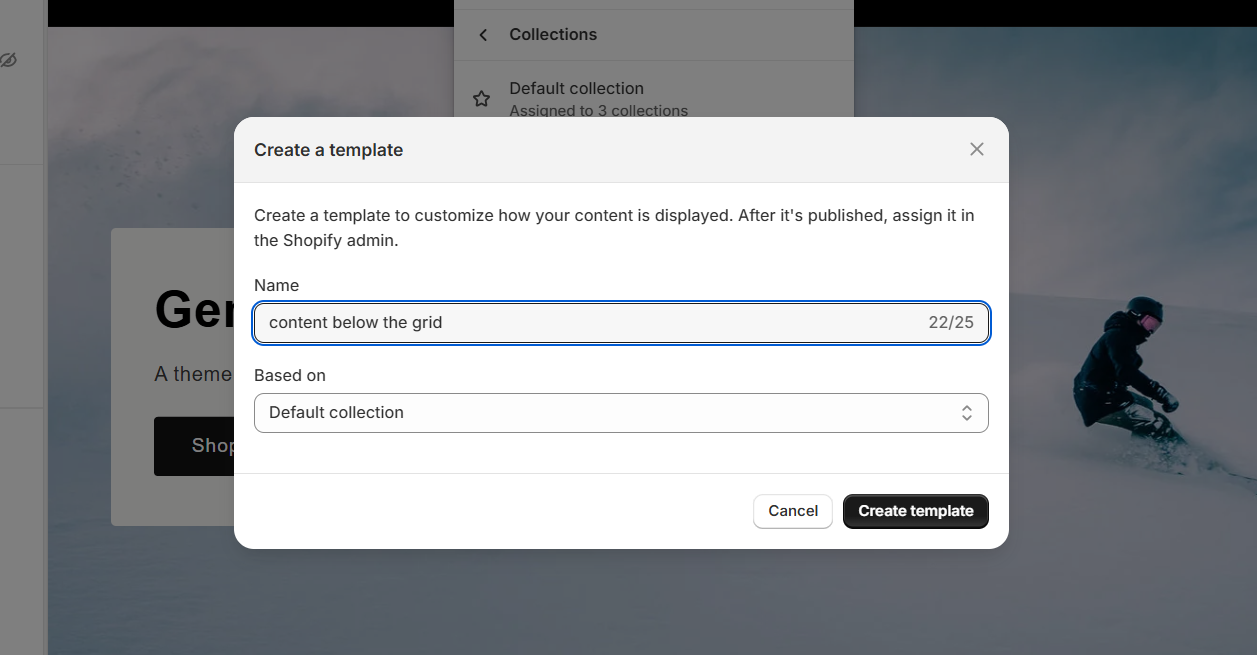
Name the new template something descriptive, and base it on the Default collection template so it starts from the existing layout.
Step 2: add a Rich text section below the product grid, on the new template specifically.
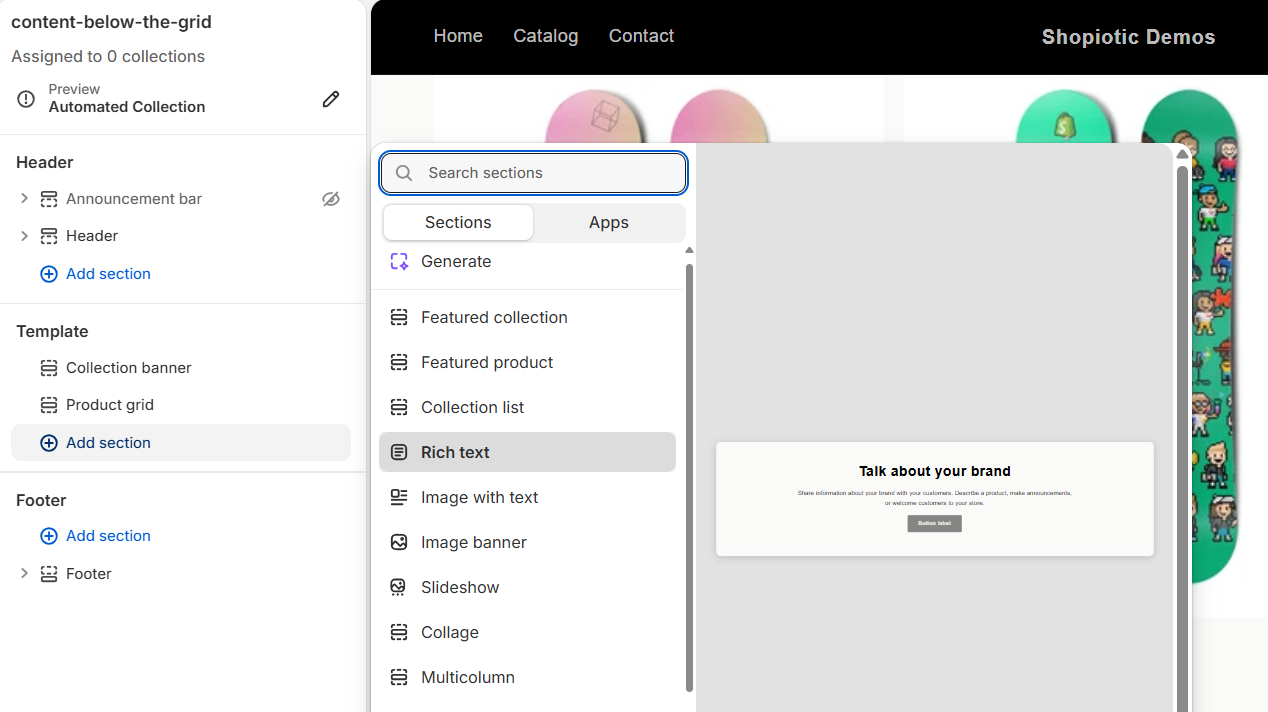
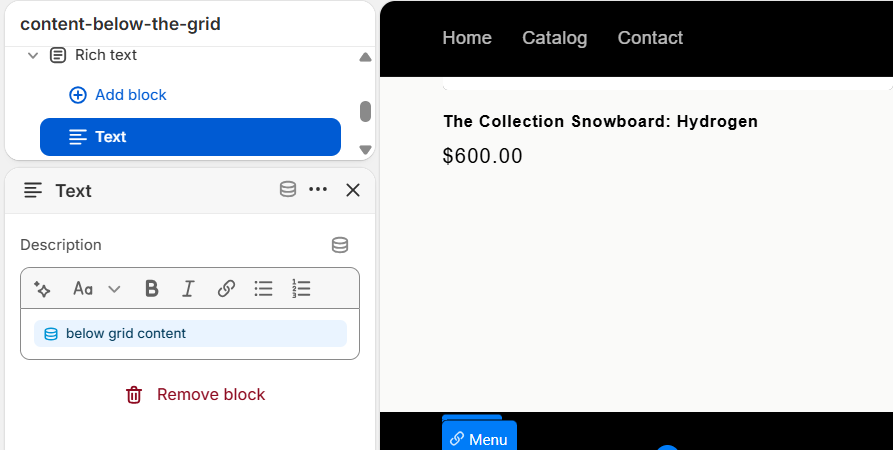
By default, the new Rich text section's Text block just holds generic static placeholder copy.
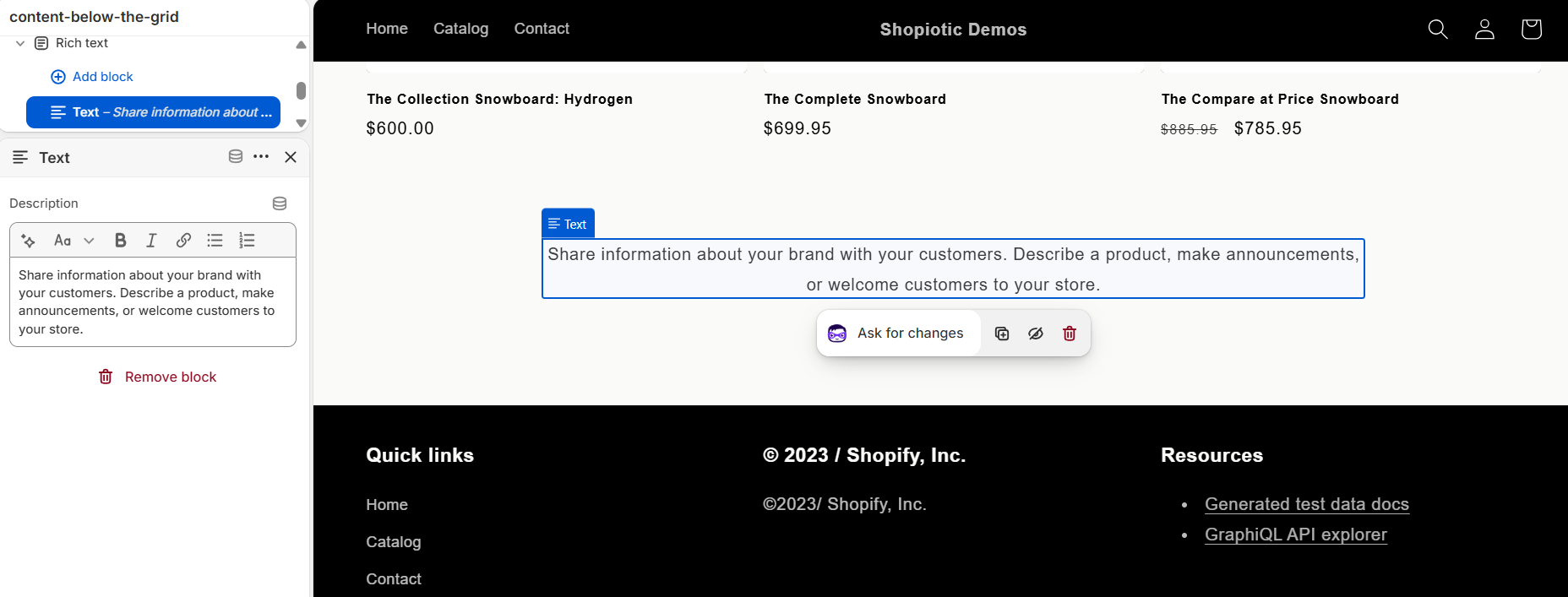
Step 3: connect that block to a metafield instead of static text. Click the small database icon in the block's toolbar, labeled "Connect dynamic source."
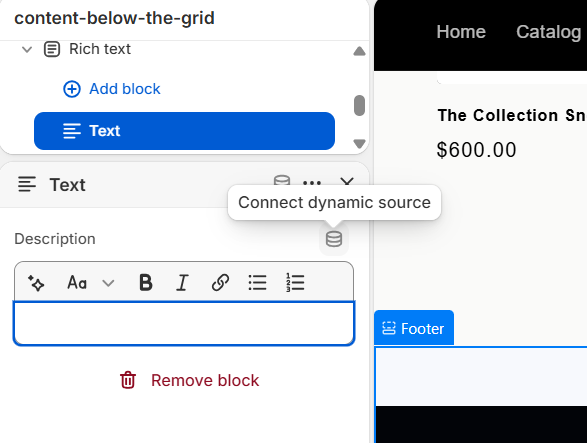
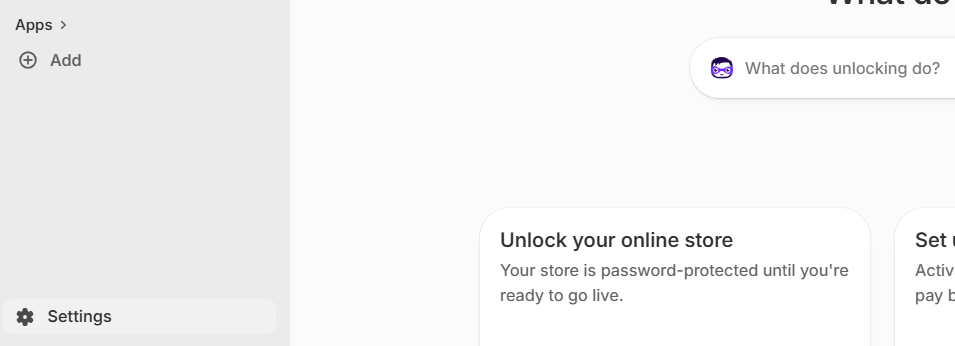
Step 4: create the metafield itself, since it doesn't exist yet the first time through. Leave the theme editor and go to Shopify admin's Settings.
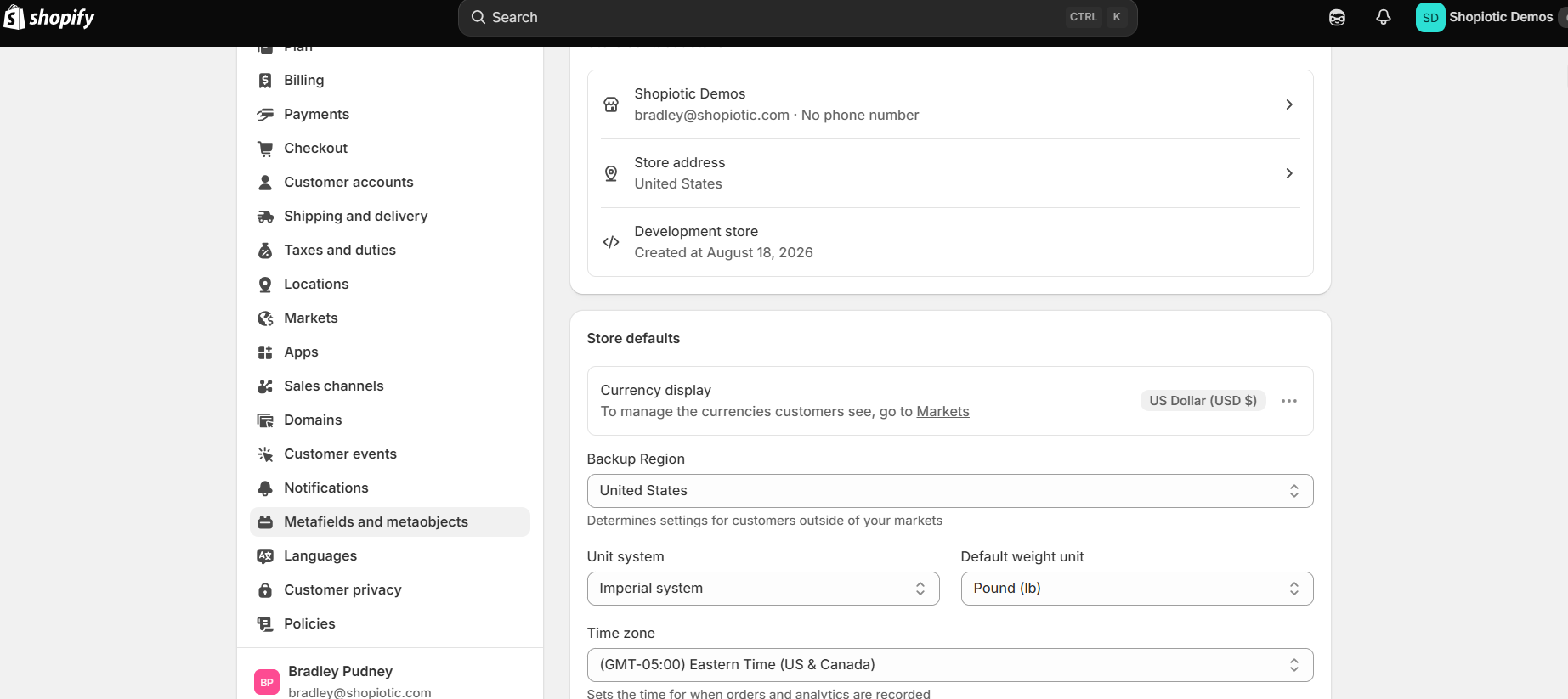
Inside Settings, click "Metafields and metaobjects."
Choose "Collections," since this metafield needs to live on collections specifically, not products or variants.
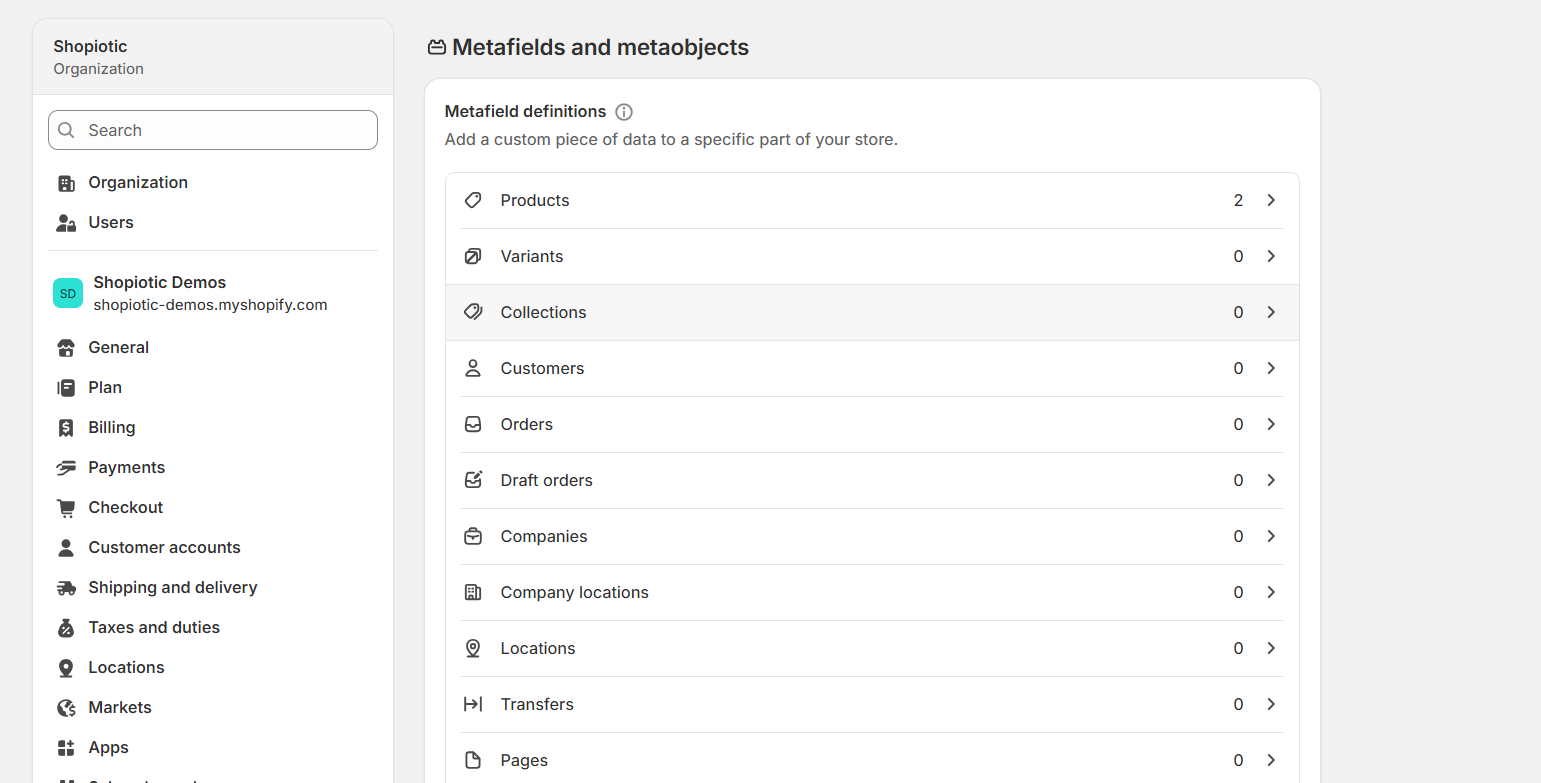
Click "Add definition."
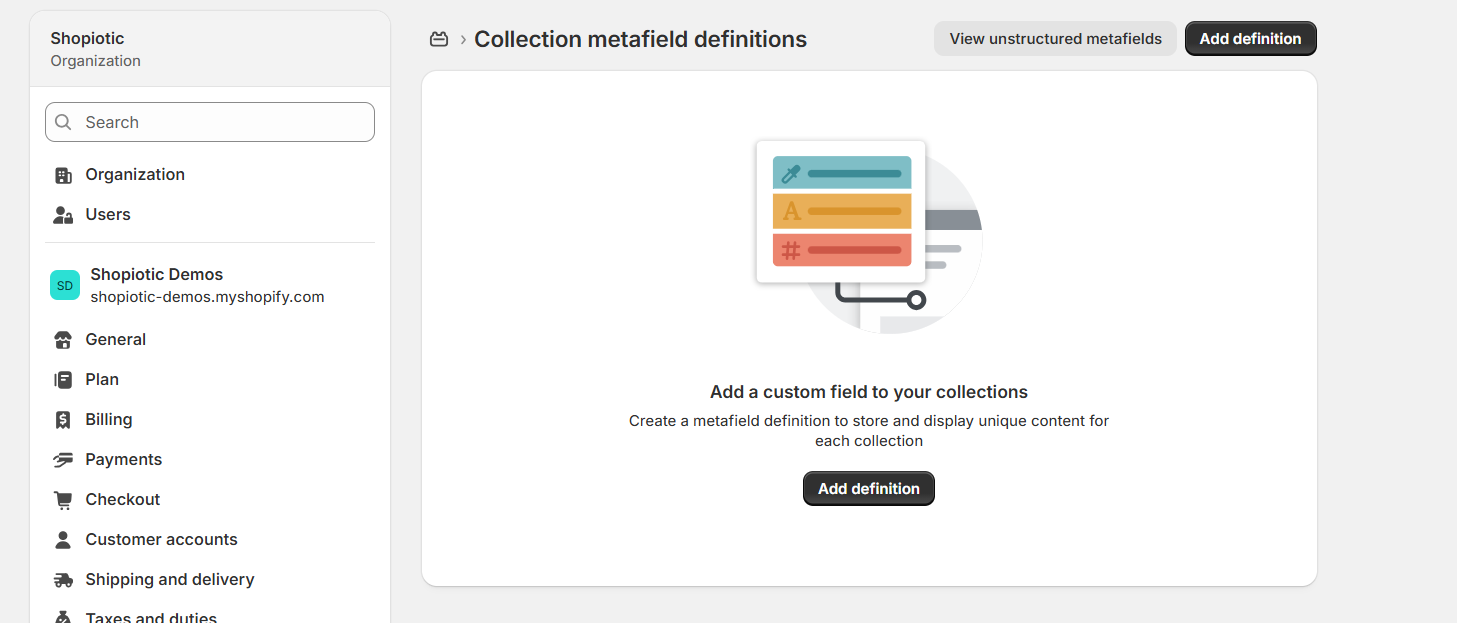
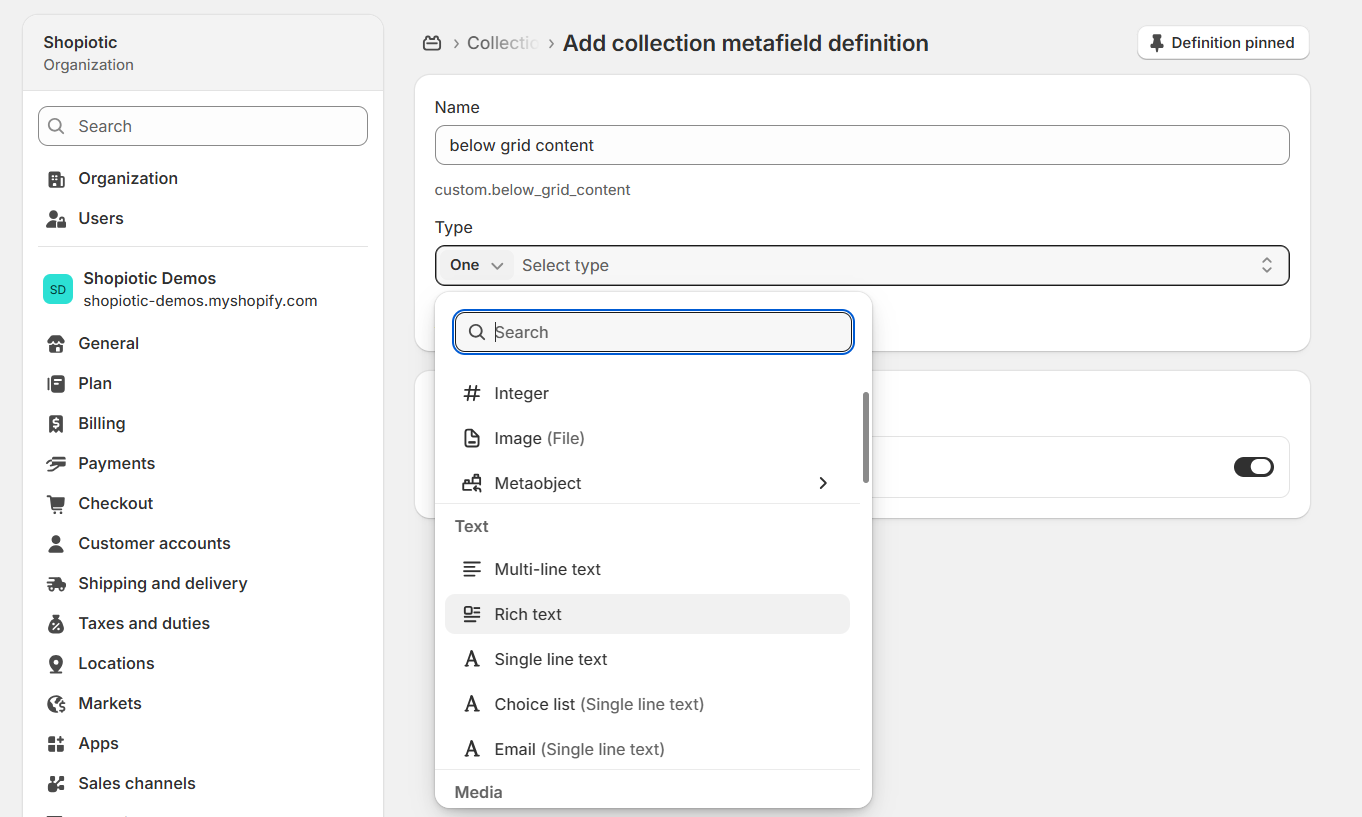
Name it something clear (Shopify auto-generates the underlying key from the name), and set its Type to "Rich text," since that's what supports real formatting rather than plain text.
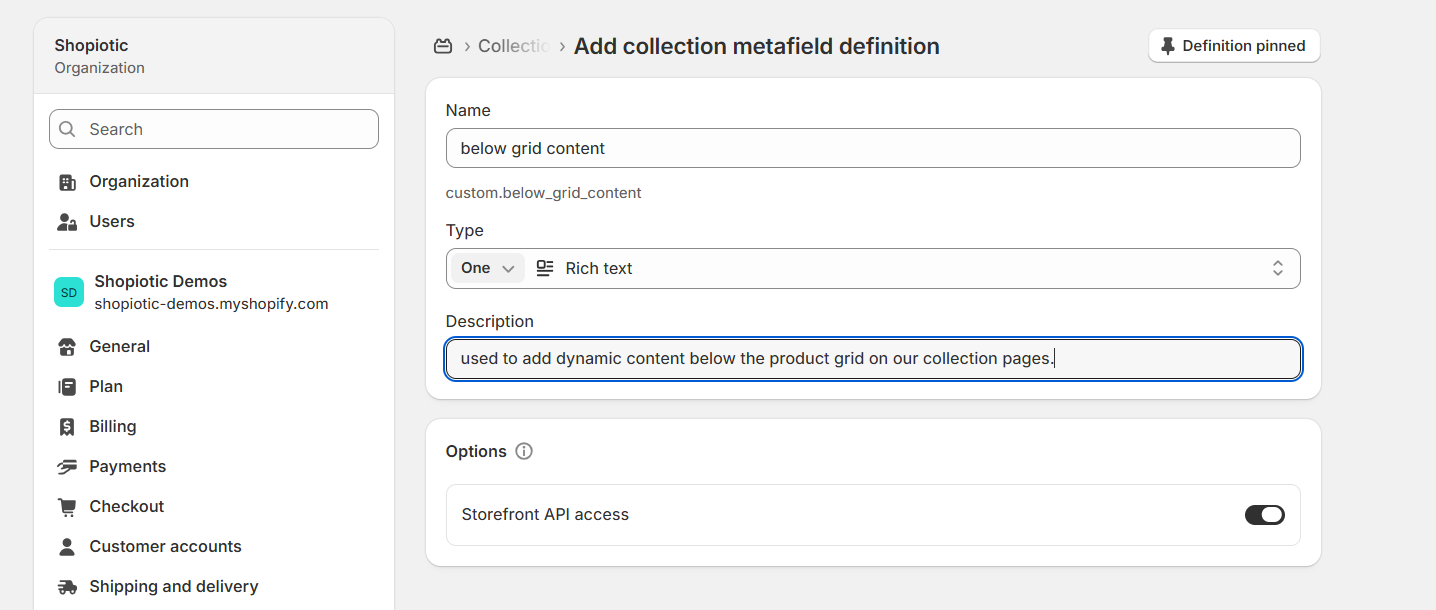
Add a short internal description so it's clear what this field is for, and leave Storefront API access enabled. Save.
Step 5: go back to the theme editor and connect the block. Reopen "Connect dynamic source" on the Text block, and the metafield you just created now shows up in the list, right alongside the built-in Title and Description fields.
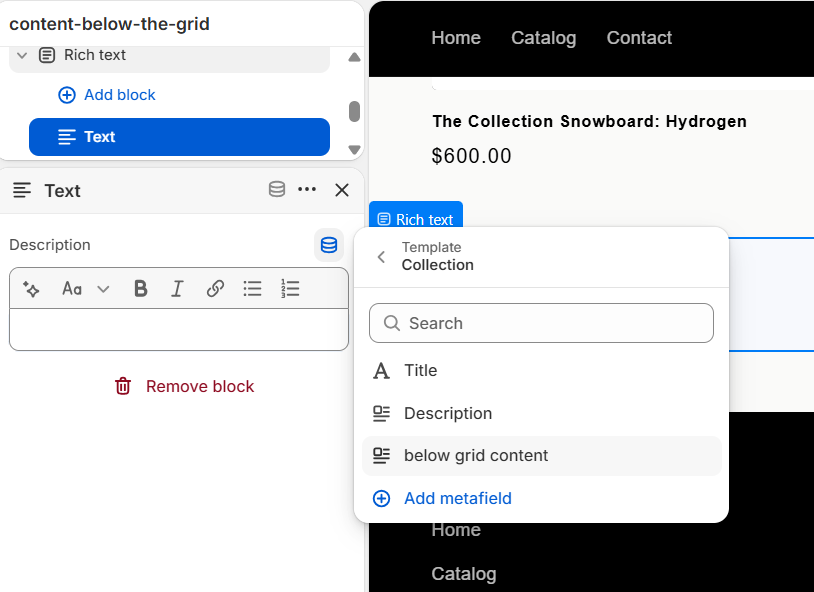
Select it, and the block is now wired to pull its content from that metafield instead of static text.
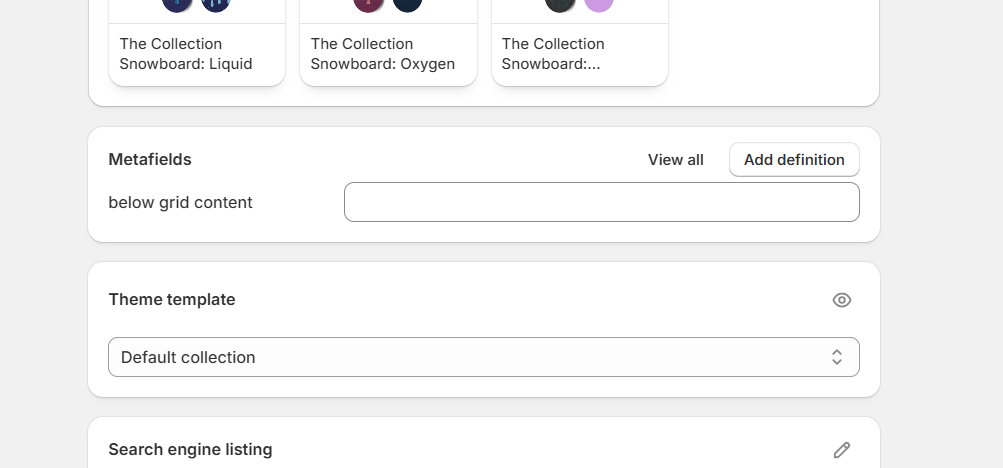
Step 6: fill in the content on the actual collection, and assign the new template. Open any collection's edit page in Shopify admin, and the new metafield now appears as an editable field, right above the Theme template selector (still showing "Default collection" at this point).
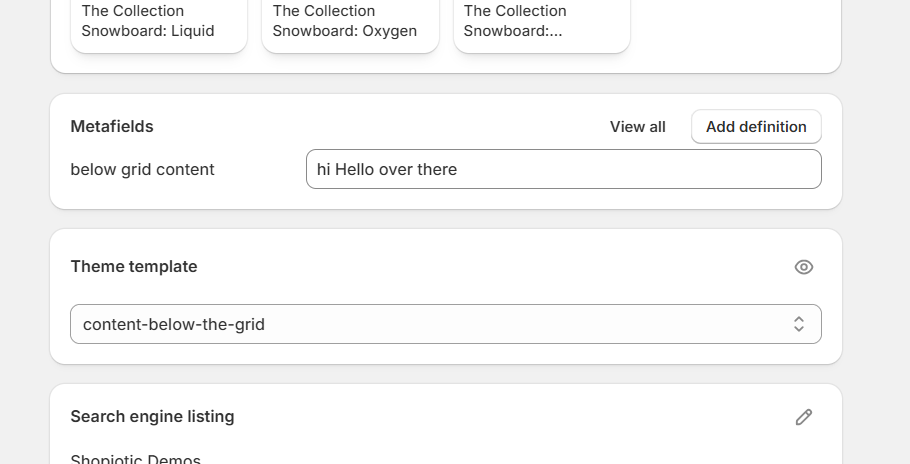
Type your real below-grid content into that field, and switch the Theme template dropdown to the new template you created. The rich text section will now render whatever's in the metafield.
An alternative if you'd rather not set up a metafield: split the single description field itself using a hidden HTML comment as a delimiter.
Edit your theme's collection-template.liquid file (on a modern Online Store 2.0 theme, this usually lives instead as a section file, commonly main-collection-banner.liquid), find where collection.description gets output, and split it into two separate calls:
{{ collection.description | split: '<!-- split -->' | first }}
Place that above the product grid. Then, wherever the longer content should appear below the grid:
{{ collection.description | split: '<!-- split -->' | last }}
From there, whoever's writing collection descriptions just types <!-- split --> inside the description field's HTML view, at the exact point where the short intro should end and the longer content should begin.
The description field's rich text editor has a "Show HTML" button in the top-right of its toolbar for exactly this:
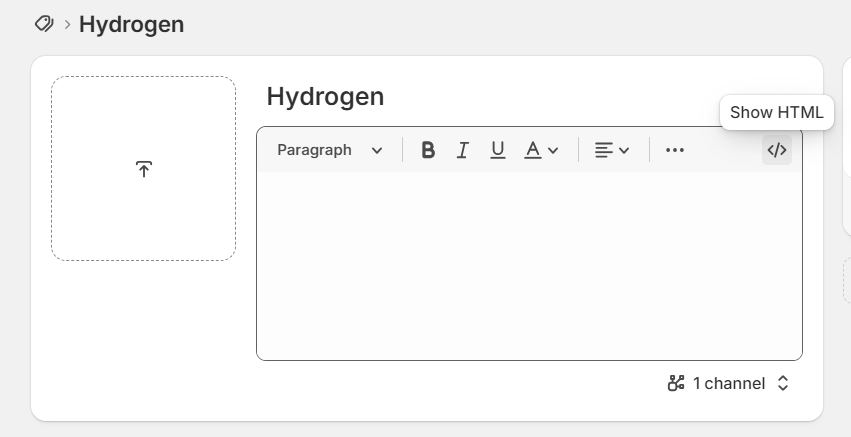
Click it, and the same field switches to a raw code view, which is where the <!-- split --> comment actually gets typed:
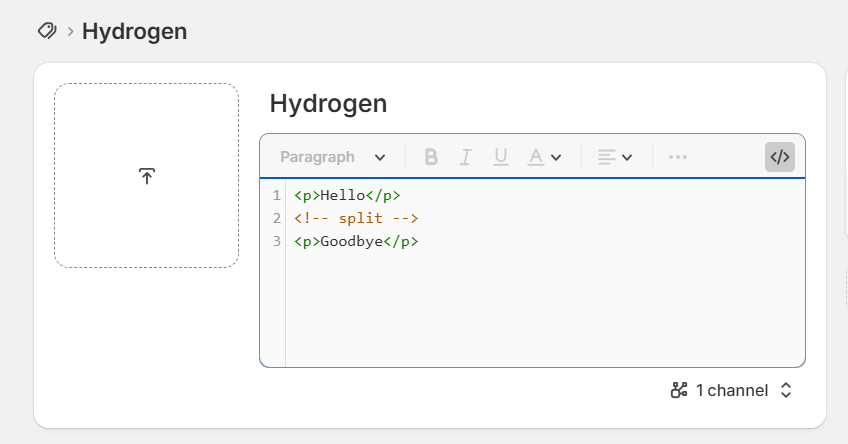
This works with no extra field to manage, but the content stays inside one plain description box rather than getting the fuller rich text editing a dedicated metafield gives you.
The Keyword Placement Checklist
This is the whole on-page checklist, and it's most of what "optimizing a page" actually means at this level.
Don't keyword-stuff beyond it. Natural placement matters more than repetition count.
- Meta title
- Meta description
- H1 (Shopify calls this the collection title)
- First sentence of the on-page content
- At least two subheadings
- Several more natural mentions throughout the body, plus your secondary/synonym keywords worked in naturally
| Element | Recommended approach | Example | Common mistake |
|---|---|---|---|
| Meta title | Target keyword first, then a real USP as the modifier, not the brand name | "Trail Running Shoes – Free 2-Day Shipping | RunCo" | Brand name first, or a generic "Shop All X" |
| Meta description | Keyword near the start, then your real USPs listed out | "Shop trail running shoes at RunCo. Free shipping on all orders. Free returns. 10,000+ five-star reviews." | Left blank, or copy-pasted across every collection |
| H1 | Plain target keyword | "Trail Running Shoes" | A "clever" rewrite Google can't literally match |
| Intro copy | 50-100 words, keyword in the first sentence | "Trail running shoes are built to handle uneven terrain, loose rock, and mud without sacrificing grip or support." | A wall of copy that buries the product grid |
Keep the meta title to roughly 50 to 70 characters, and the meta description to roughly 120 to 160 characters. Go much past either range and Google truncates it in the search results with an ellipsis.
A real example worth studying: Get Laid Beds' "Solid Oak Bed Frames" listing leads with the keyword, then a real USP ("11-Year Warranty") instead of a brand name, and its meta description opens with the exact keyword phrase (which Google bolds), followed by specific, real differentiators, no veneers, no composites, a stated weight capacity, not vague marketing language.

Generally, don't put your brand name in the meta title unless you're a larger, well-recognized brand where the name itself helps click-through.
For most stores, that character budget is better spent on a real USP: free shipping, a bigger size range, whatever your customers actually care about most.
Meta descriptions aren't officially a direct ranking factor, but they're worth taking seriously anyway. When the searcher's own keyword appears in the displayed snippet, Google bolds it, and that draws the eye and drives click-through.
Click-through rate is itself a signal Google's algorithm appears to weigh, so a strong meta description likely has some indirect effect on ranking even if it isn't a direct one.
Avoiding Cannibalization Between Your Own Pages
One more thing worth checking before you move on: make sure the keyword you just optimized for isn't already quietly targeted by a different page on your own site.
Keyword cannibalization happens when two pages target the same search intent and split the signals that should help one clear page rank. Keyword overlap on its own is not enough to prove cannibalization.
On ecommerce sites, the most common version is a product page and a collection page fighting over the same broad keyword, usually because the collection was built to target a term a product page was already ranking for, without anyone checking first.
I've seen this play out in a genuinely sneaky way on a real client site. Several product description pages contained internal links pointing at a different product page, using an exact-match keyword phrase as the anchor text.
The theme's styling didn't underline text links on product pages though, so the links were completely invisible to a human reader while remaining fully visible to Google.
That explained something that had been confusing everyone on the account: a specific product page, not the collection page it should have been, had been quietly ranking for the target keyword the entire time.
If you suspect this is happening on your own store, Google your target keyword first and see what's actually winning right now. Don't assume a historical pattern still holds.
Then optimize whichever page type genuinely matches current intent, and retarget or de-optimize the other rather than letting both keep competing.
I'll cover the anchor-text side of this fix in the next section.
Pillar Four: Internal Linking Between Collections
Here's the step almost every store skips entirely, and it's a real shame.
An internal link costs nothing and takes minutes to add, against weeks of outreach for a backlink of comparable value.
Nearly nine in ten ecommerce brands lack a genuinely optimized internal-linking structure, and that number barely improves even among the highest-traffic sites. Roughly 41% of the best-performing ecommerce sites still get this wrong.
If your own internal linking is a mess, you're in the majority, not an outlier.
Decide Which Collections Actually Matter Most
Before you start distributing links, figure out which pages on your site are actually going to make the most money if they rank well.
Usually that's some combination of high-ticket items, decent search volume, and realistic competition, the collections where the effort-to-payoff ratio is genuinely best.
In a typical Shopiotic strategy, we land on somewhere around three to five collections we think can generate real revenue if we get them into the number one or two spot for their target keyword.
We treat those as priority collections internally, and deliberately point more internal links at them than at everything else. That extra internal-link weight is a real signal to Google that these are the pages that matter most on the site, and it genuinely helps them rank.
Hub and Spoke (or "Spider Web")
The pattern goes by two names internally, hub and spoke, or spider web, but it's the same idea either way.
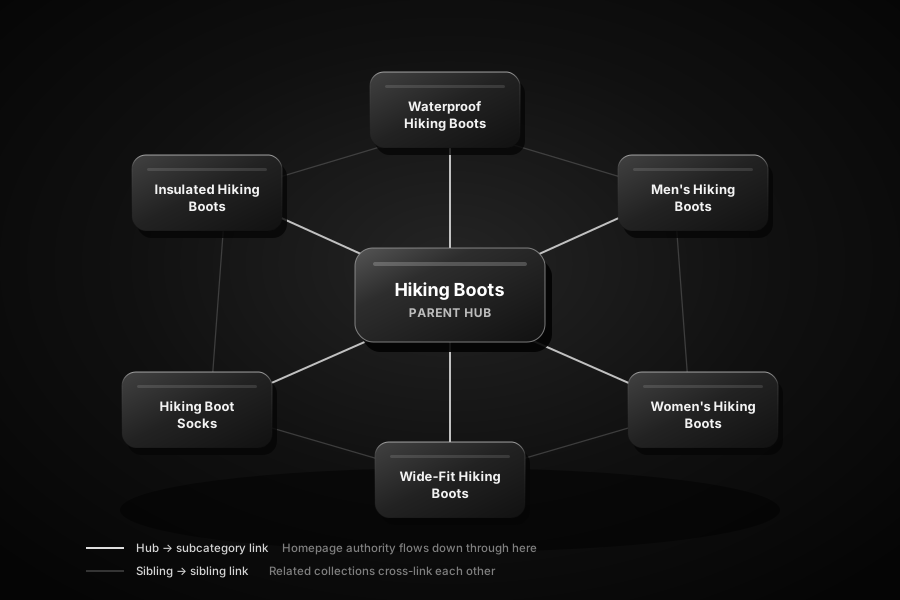
A priority collection acts as a hub, linking out to relevant sibling subcollections and supporting blog content, while those pages link back to the hub in turn.
A few concrete rules that make this actually work in practice:
- Link from your main menu to your priority collections directly. Authority flows down from wherever it's strongest, and for almost every store that's the homepage, since most of a site's backlinks tend to point there. You don't need to cram every collection into the menu, but your genuine priority collections should have a slot in it.
- Link from the footer too, for your larger or highest-priority collections. It's an additional, real signal of importance to Google, and it's a natural place to point at your broader, parent-level collections specifically.
- Keep priority collections within 2 to 3 clicks of your homepage. A page with perfect content and a perfect meta title still won't rank if it's buried five clicks deep in your navigation.
- Link sideways between related collections, somewhere in the range of 4 to 6 links on a typical collection page, prioritizing sibling subcollections over unrelated ones.
- A simple, low-effort format that works well: a pipe-separated list of related collections directly on the page. Something like "Men's Gym Clothes | Women's Gym Clothes | Teenage Gym Clothes | Breathable Gym Clothes." No custom component required, just a line of real text links.

- Check your links have real anchor text, not just an image. A hero banner or grid tile linking to a key collection with no text behind it reads to a crawler as a link with blank anchor text, wasted signal to a page that matters.
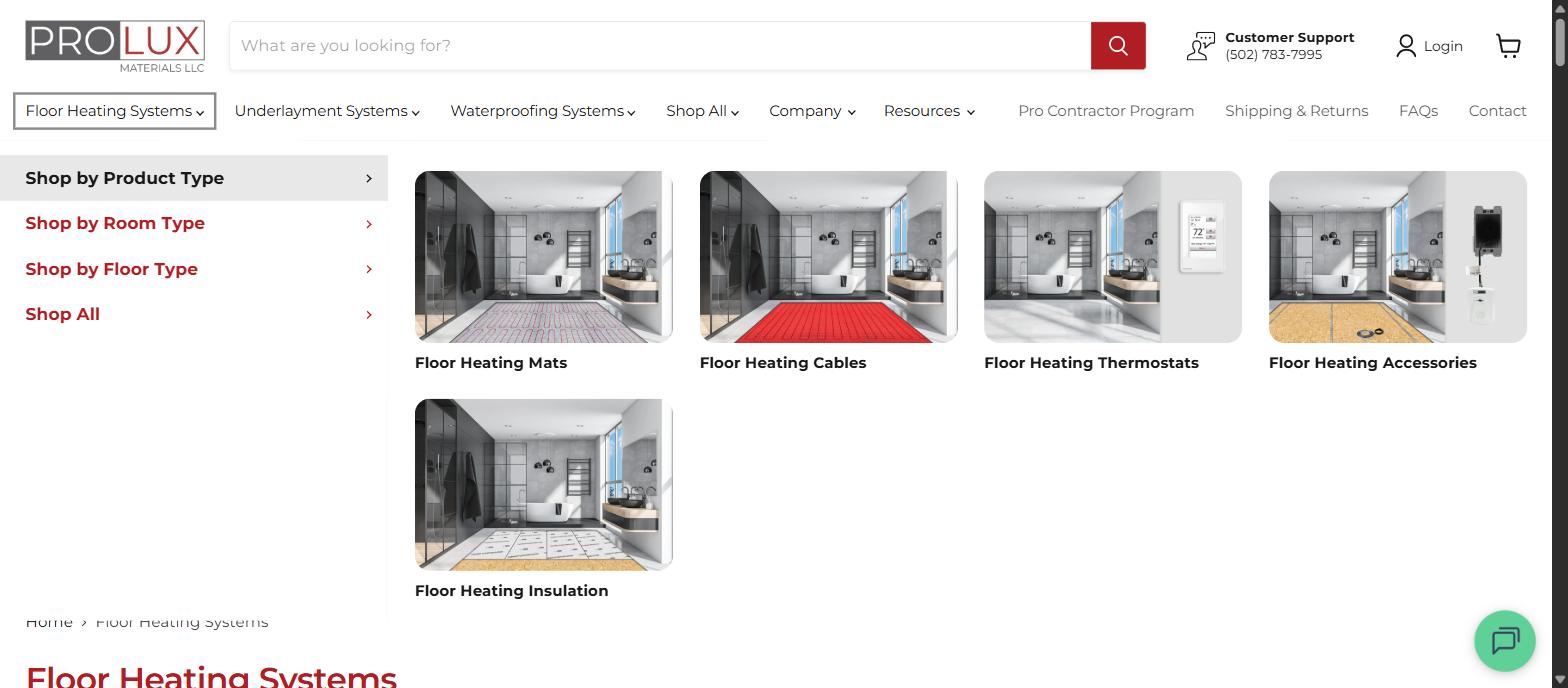
- Never link a collection or product page up to a blog post. A product page's only job is moving someone toward checkout. A link back up to educational content is, functionally, an exit ramp.
Anchor Text: Exact-Match Is Fine Internally, But Vary It
One useful distinction worth remembering: exact-match anchor text is a safe, reasonable default for internal links specifically.
That's a different rule than backlinks, which need a more diversified mix (covered in the next section).
Even so, don't use the exact same anchor text every single time you link to a given page. Cycle through a few real variations of your target keyword instead.
It keeps the link profile looking natural to Google, and it genuinely helps that page pick up rankings for more than just the one exact phrase.
If a visitor is already on your site, reinforcing the keyword you want a page to own is a low-risk, high-signal move either way.
Don't Forget Blog-to-Collection Linking
If you publish blog content at all, it belongs in this same hub-and-spoke picture, just one level further out.
Think of a collection page as the hub, and topically related blog posts as the spokes supporting it.
Say you've got a chocolate protein powder collection page. Supporting blog content might include something like "The 7 Best Chocolate Protein Powders" or "People's Favorite Protein Powder Flavors," both targeting informational searches that a collection page itself can't compete for.
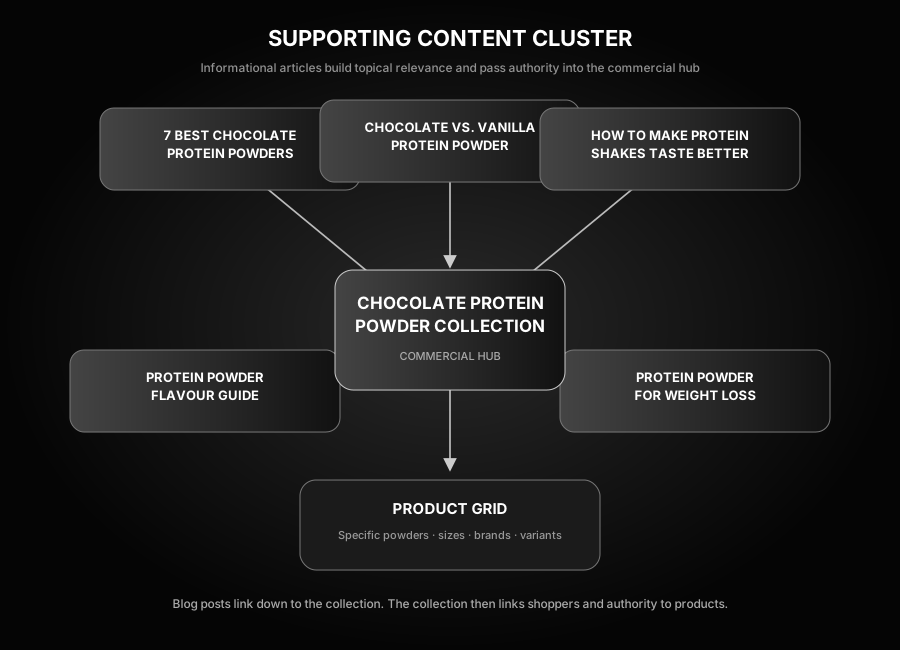
Link from those blog posts down to the collection page. If the blog content is genuinely getting its own traffic, that traffic becomes a real signal you're passing straight to the collection page underneath it.
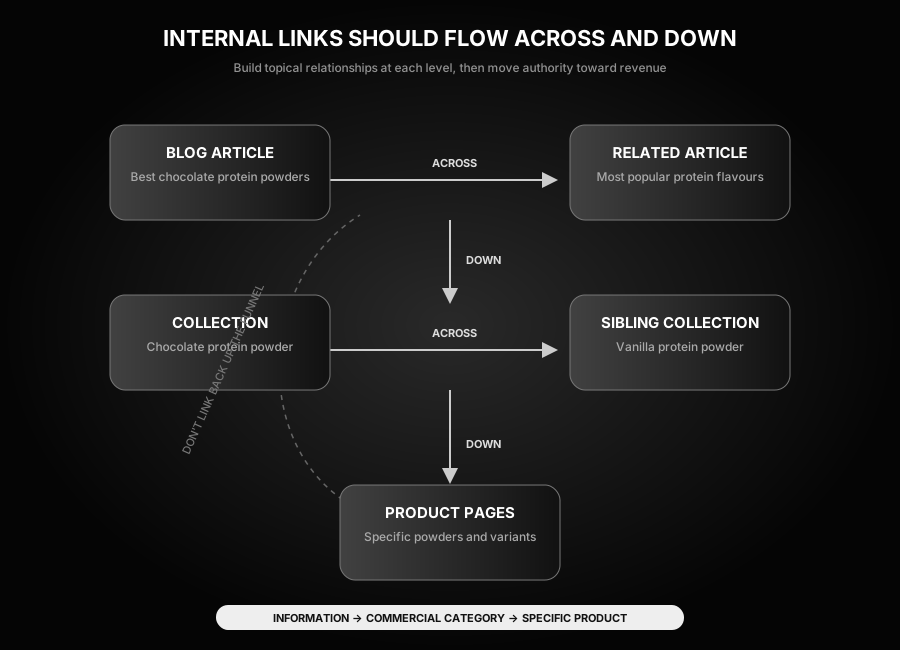
The funnel direction rule still applies here in full: blog posts can link down to collection pages, but collection pages should never link back up to blog posts.
Collection pages can still link sideways to other collections, and down to the products in their own grid. Blog posts can also link sideways to other related blog posts within the same topic cluster.
Pillar Five: Backlinks, and Where They Actually Belong
Worth being upfront about something before getting into the mechanics: paying directly for backlinks is technically against Google's own guidelines.
In practice, done carefully, with real vetting and natural-looking placements, it's a safe and standard part of how Shopify SEO actually gets done. We've never had a Google penalty for it, and we can see that directly in our own Search Console across every client we manage.
I've personally spent more than $10,000 on backlinks across Shopify SEO campaigns. That experience includes choosing placements, rejecting poor-quality sites, tracking budgets, and seeing which links actually improve rankings rather than merely looking impressive in a report.
There are other ways people recommend earning links "naturally," but realistically, unless you're already a large, well-known brand, links mostly don't just show up on their own.
Paying for a well-vetted placement is often genuinely cheaper than the amount of time it would take to earn the same link some other way.
Almost every real Shopify SEO strategy should carry some ongoing link-building budget. As a starting point, I'd budget at least $400 a month, which typically buys two to three real backlinks if you're spending it carefully.

Backlinks matter for collection pages, but not the way most people assume, and getting the distribution wrong can waste real budget.
Collections Get the Smallest Share, on Purpose
Our own real link-distribution split looks like this: roughly 50% of links to the homepage, 25% to collection pages, and 25% to the site's best blog articles (or back to the homepage, if there isn't strong blog content yet).
Internal linking is what then carries that authority down from the homepage and blog posts to the actual collection pages doing the selling.
Never build backlinks directly to product pages. Google treats a direct link to a single product as inherently suspicious, since no independent site has a natural reason to link straight to one SKU.
That authority has to arrive at the product page through internal linking instead, flowing down from the homepage, collections, and blog content that did earn real backlinks.
Vetting a Site Before You Pay for a Link
Not every site offering a paid placement is worth the money.
The difference between a genuinely useful link and a wasted one usually shows up in a handful of specific numbers:
- Domain authority: 30+ as the real target.
- Organic search traffic: 15,000+ monthly visits is ideal; 5,000+ is an acceptable floor if the site otherwise looks legitimate.
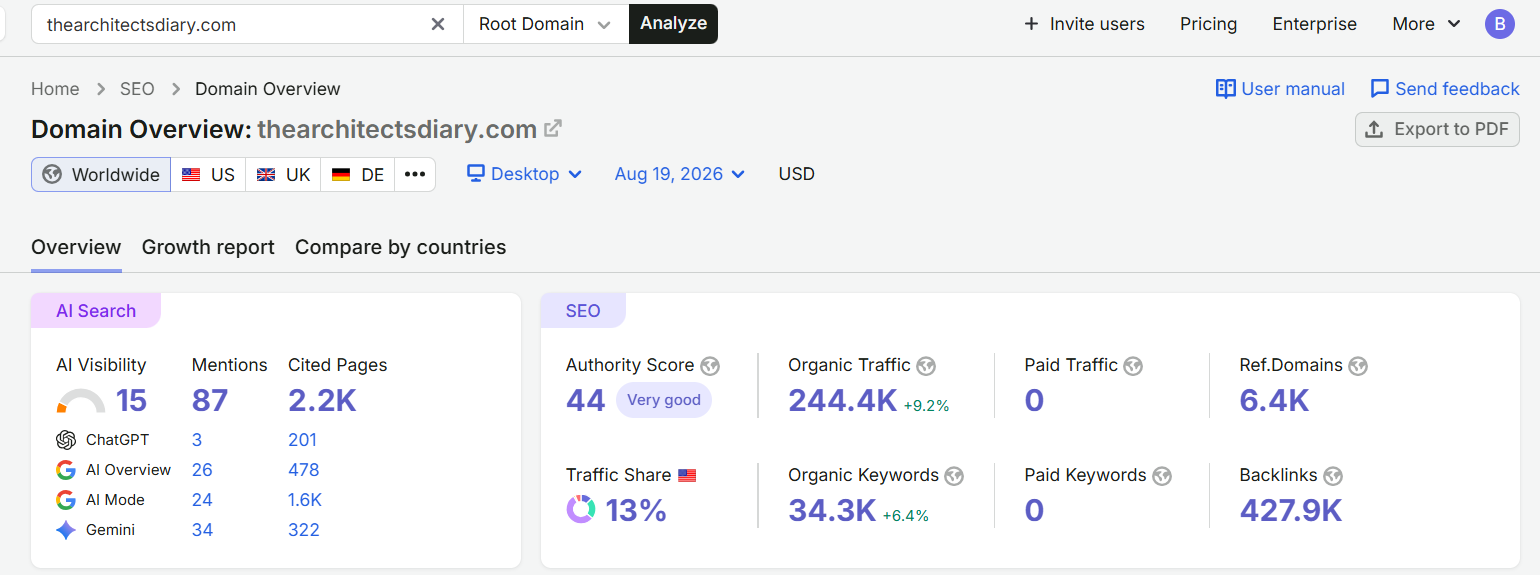
- Traffic trend over the last six months should not show a sharp cliff. A slow, gradual decline is very different from a sudden collapse, which usually signals a Google penalty, and linking from a penalized site risks dragging your own site down with it.
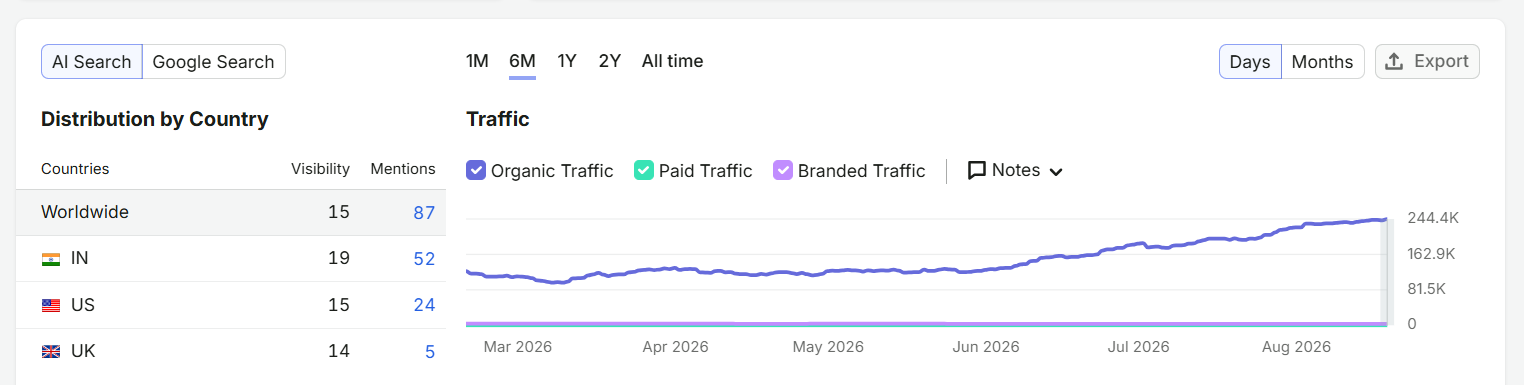
- Referring-to-outbound domain ratio: outbound domains shouldn't outnumber referring domains by more than roughly 1.5 to 2 times. A page stuffed with far more outbound links than its authority justifies is a common sign of a site that's really just selling links en masse, and often an early warning sign the site is heading for a collapse.
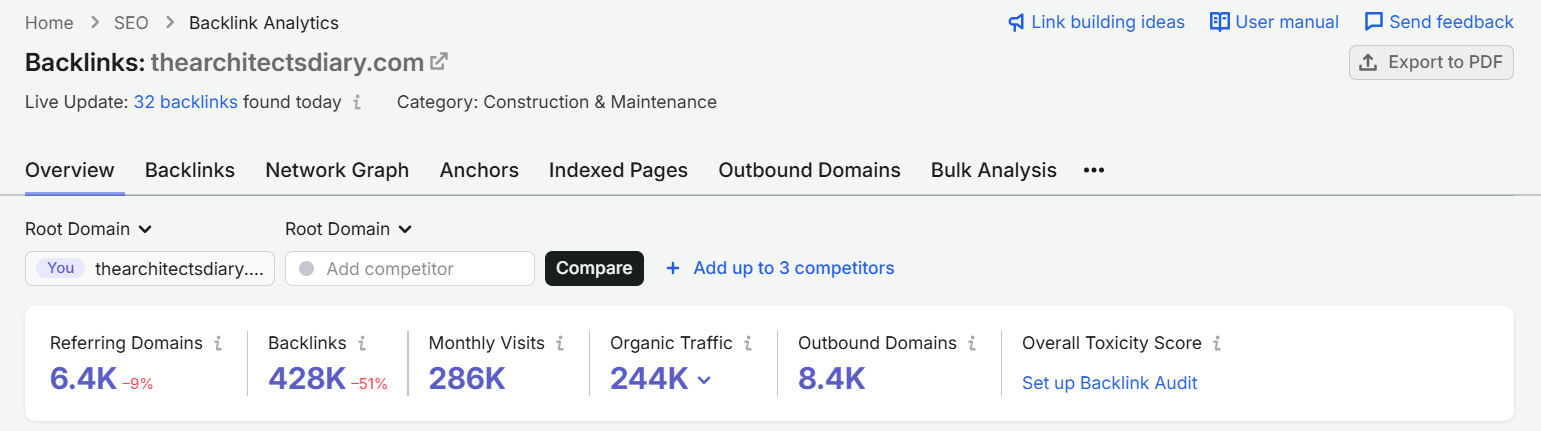
Here's what skipping this vetting actually looks like in practice, in real numbers.
Early on, I tried an outsourced link-building marketplace once: 5 links for $600, placed as AI-generated guest posts on sites like a "mommy blog" and a UK home-decor site. Cheap and easy on paper.
Checking the actual numbers against the thresholds above told a different story. Average domain authority: 18.4, well below the 30+ target. Average organic traffic: just 719 a month, well below even the 5,000 floor.
And the real red flag: an average traffic drop of 4,348 fewer visits a month over the prior six months, exactly the sharp-cliff pattern the vetting checklist above warns about.
That's the direct reason I brought most link building in-house rather than continuing through marketplaces.
Link marketplaces aren't inherently a bad option, to be fair, especially if you're struggling to source links any other way. I've used them myself.
The real requirement is using a marketplace that actually lets you see and choose the specific site a link will go on, rather than a blind placement you have no visibility into.
Whichever way a link comes to you, never trust the metrics quoted on a marketplace listing or in a spreadsheet a seller sends over. Those numbers can shift fast, and they're often exaggerated or outright fabricated.
Always check the real numbers yourself, directly in a tool like SEMrush, Ahrefs, or Moz, before paying for anything.
Now getting 4 to 5 links for that same roughly $600 that are worth two, five, even ten times more than what the marketplace produced.
My own conclusion, worth repeating to anyone tempted by an easy-looking link package: the ease of link marketplaces seems too good to be true, and in most cases, it is.
Backlink Gap Analysis: Figuring Out How Many Links You Actually Need
Beyond just vetting individual sites, it helps to know roughly how many quality backlinks a given collection page actually needs to have a real shot at ranking. Here's the process:
- Search your target keyword in an incognito browser window, so your own search history and location don't skew the results.
- Pull the top 2 to 4 ranking pages for that keyword.
- Take each page's specific URL (not the domain) into SEMrush's Backlinks tool.
- Filter the results to Active links only, Follow links only, links that are in the content (not sidebar or footer placements), and referring pages that are in English. What's left is a realistic picture of the links actually contributing to that page's ranking.
- Average the count across your top 2 to 4 competitor pages. That average is a realistic target for how many quality backlinks your own page likely needs.
- Compare that target against how many quality backlinks your own page already has. The difference is your gap. If the target is 4 and you already have 2 solid links pointing at the page, your real gap is just 2 more.
This turns "how many backlinks do I need" from a guess into an actual number you can plan a budget and timeline around.
That filtering step matters far more than it might look like at first glance. Take a real running shoes category page, Fleet Feet's /browse/shoes.
Pull it into SEMrush's Backlinks tool with no filters applied and it shows roughly 19,454 total backlinks.
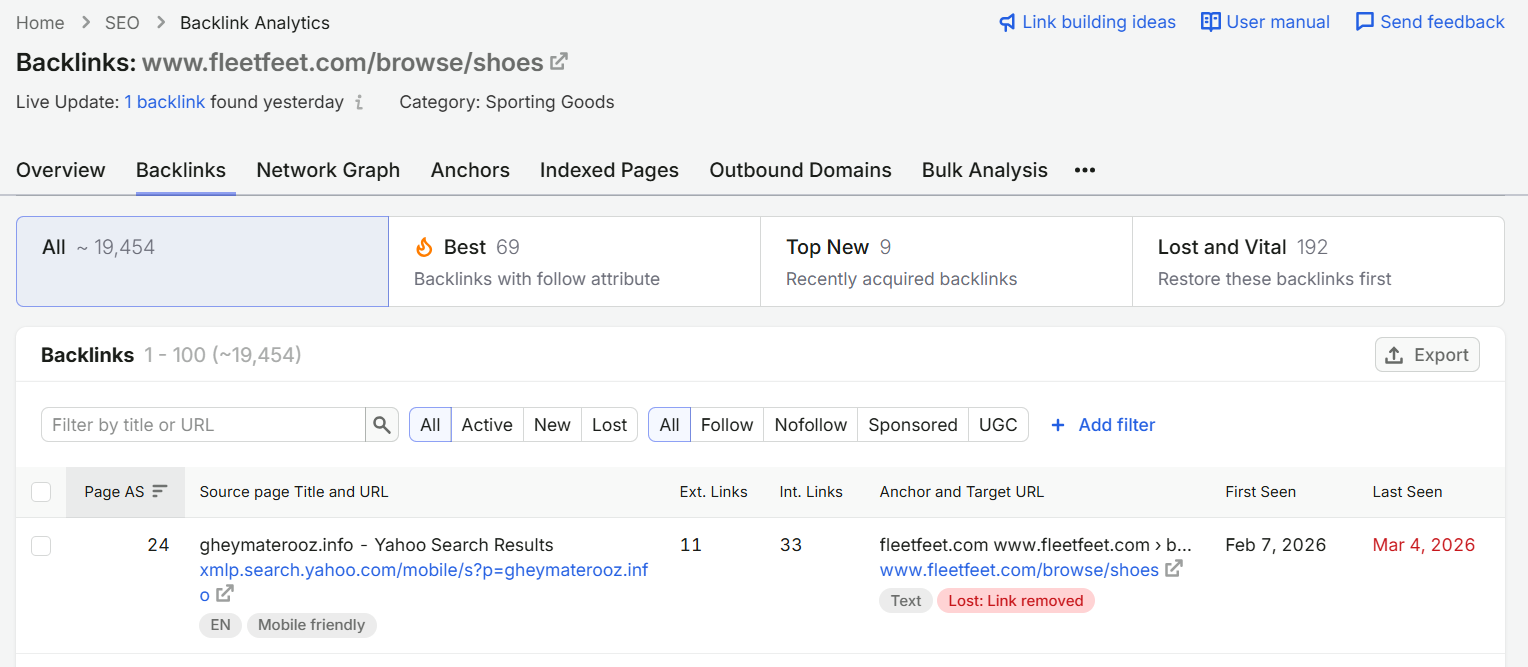
That number is essentially useless for planning purposes. It counts nofollow links, sidebar and footer placements, non-English referring pages, and long-dead links that were never cleaned out of the index.
Apply the real filters (Active, Follow, Link placement: Content, Ref. page language: English) and the same page drops to 296 backlinks.
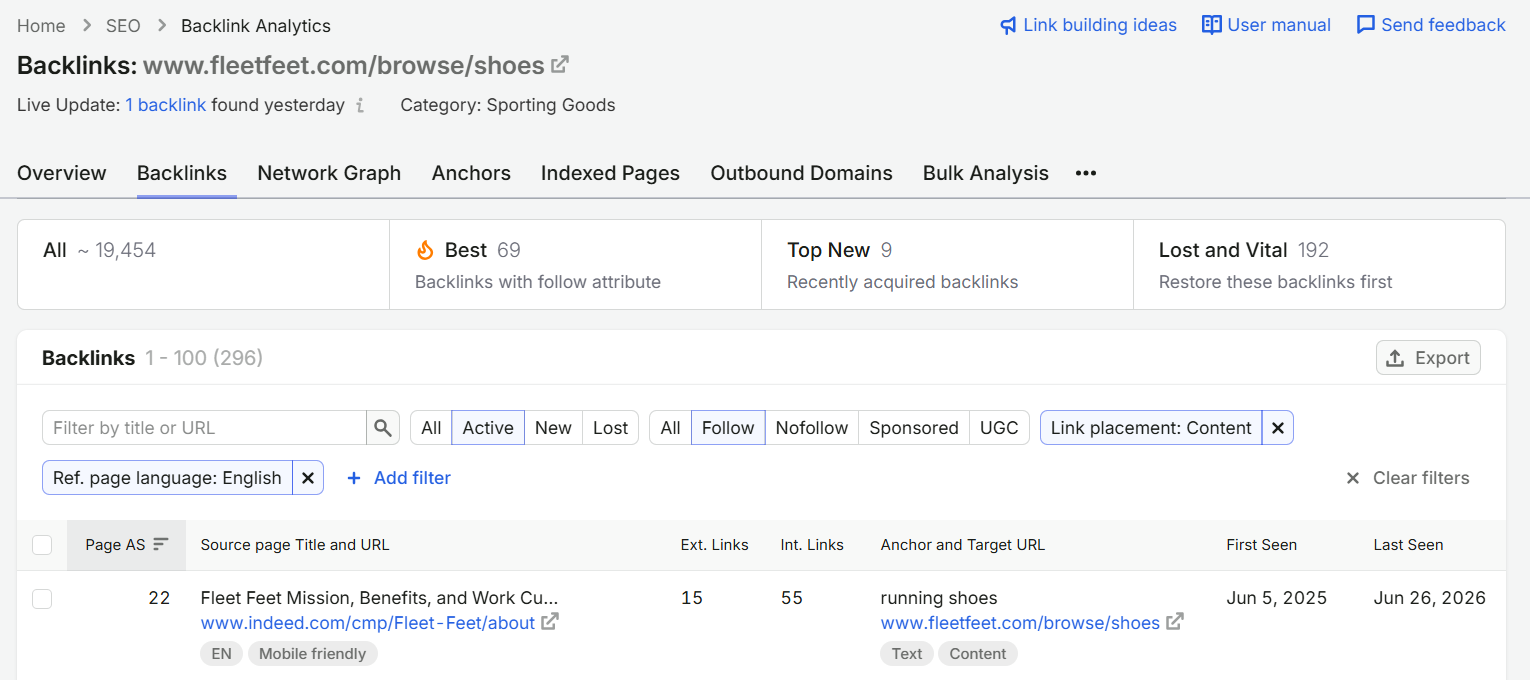
Still a lot, since this is a genuinely competitive, well-established page, but 296 is the number actually worth reasoning about.
Always filter before you count. An unfiltered total will make a page look like it needs (or already has) far more link authority than it really does.
A Realistic Sense of Cost
Top-ranking pages carry roughly 3.8 times more backlinks than lower-ranking ones on the same term, so this isn't a corner worth skipping once a collection is close to ranking.
Expect somewhere around $100 to $250 for a genuinely quality link, factoring in real vetting and negotiation. That's well above the industry-wide average of roughly $83 a link, which usually reflects a much lower quality bar.
Pillar Six: The Technical Side of Collection Page SEO
Everything above assumes the technical foundation underneath it is sound.
This is where shopify collection seo optimization stops being about writing and starts being about making sure Google can actually crawl, parse, and trust what you've built.
Here's what specifically matters for collection pages.
Schema Markup
Every collection page should carry BreadcrumbList schema, CollectionPage schema with an ItemList listing the products shown, and, where the page has an FAQ section, FAQPage schema alongside them.
Don't stop at breadcrumbs alone if the page also has FAQ content sitting right below the schema discussion, or if it's genuinely a product listing page that calls for ItemList. That's the exact gap worth avoiding: mentioning one schema type while the page itself clearly calls for another.
{
  "@context": "https://schema.org",
  "@type": "BreadcrumbList",
  "itemListElement": [
    {
      "@type": "ListItem",
      "position": 1,
      "name": "Home",
      "item": "https://yourstore.com/"
    },
    {
      "@type": "ListItem",
      "position": 2,
      "name": "Underfloor Heating",
      "item": "https://yourstore.com/collections/underfloor-heating"
    },
    {
      "@type": "ListItem",
      "position": 3,
      "name": "Heated Bathroom Flooring",
      "item": "https://yourstore.com/collections/heated-bathroom-flooring"
    }
  ]
}
If the collection page has an FAQ block below the grid, add FAQPage schema alongside the BreadcrumbList markup above, not instead of it:
{
  "@context": "https://schema.org",
  "@type": "FAQPage",
  "mainEntity": [
    {
      "@type": "Question",
      "name": "Is underfloor heating worth it for a small bathroom?",
      "acceptedAnswer": {
        "@type": "Answer",
        "text": "For most small bathrooms, yes. The running cost is low relative to the comfort gain, and electric systems are simpler to retrofit than a full wet system."
      }
    }
  ]
}
And to describe the actual product listing itself, add CollectionPage schema with a nested ItemList:
{
  "@context": "https://schema.org",
  "@type": "CollectionPage",
  "name": "Heated Bathroom Flooring",
  "url": "https://yourstore.com/collections/heated-bathroom-flooring",
  "mainEntity": {
    "@type": "ItemList",
    "itemListElement": [
      {
        "@type": "ListItem",
        "position": 1,
        "url": "https://yourstore.com/products/luxheat-heating-mat"
      },
      {
        "@type": "ListItem",
        "position": 2,
        "url": "https://yourstore.com/products/luxheat-heating-cable"
      }
    ]
  }
}
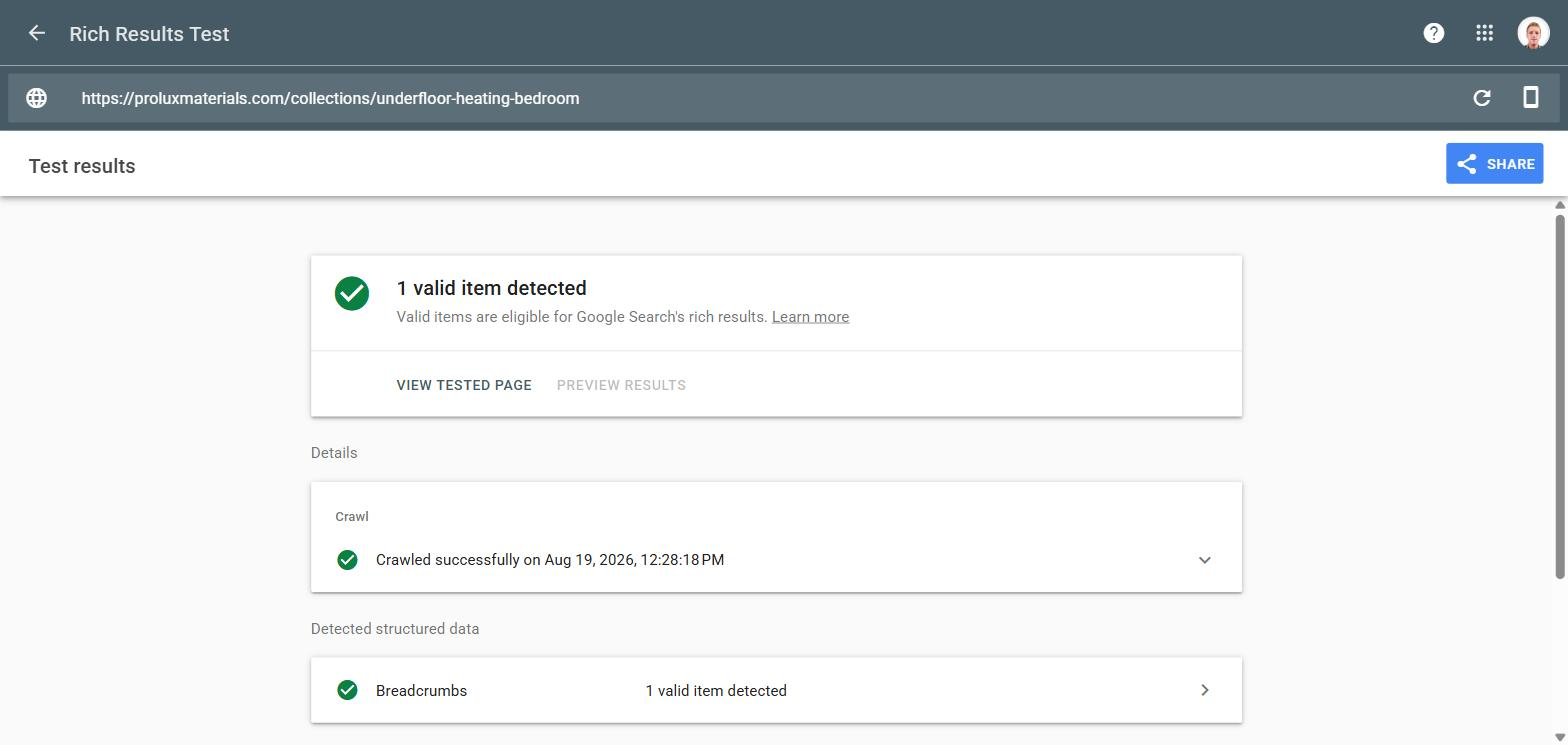
Once schema is added, validate it with Google's Rich Results Test rather than assuming the code is correct because it looks right by eye.
It reports exactly which types it detected and any errors or warnings per property.
Also worth checking before adding anything custom: view the page's existing source and confirm your theme isn't already auto-outputting schema for that page type.
Two competing schema blocks of the same type on one page confuses Google's parser, and can prevent either from working.
Faceted Navigation
If your collections use filters (size, color, price, material), check what happens to the URL when a shopper applies one.
On most Shopify themes and filter apps, applying a filter generates a new, crawlable URL, something like /collections/hiking-boots?filter.size=10.
Individually, none of these look dangerous. At scale, they're a real problem.
A collection with ten filter options across a few filter types can generate hundreds of near-duplicate URLs, all competing with your actual target page and burning crawl budget Google could be spending on pages that matter.
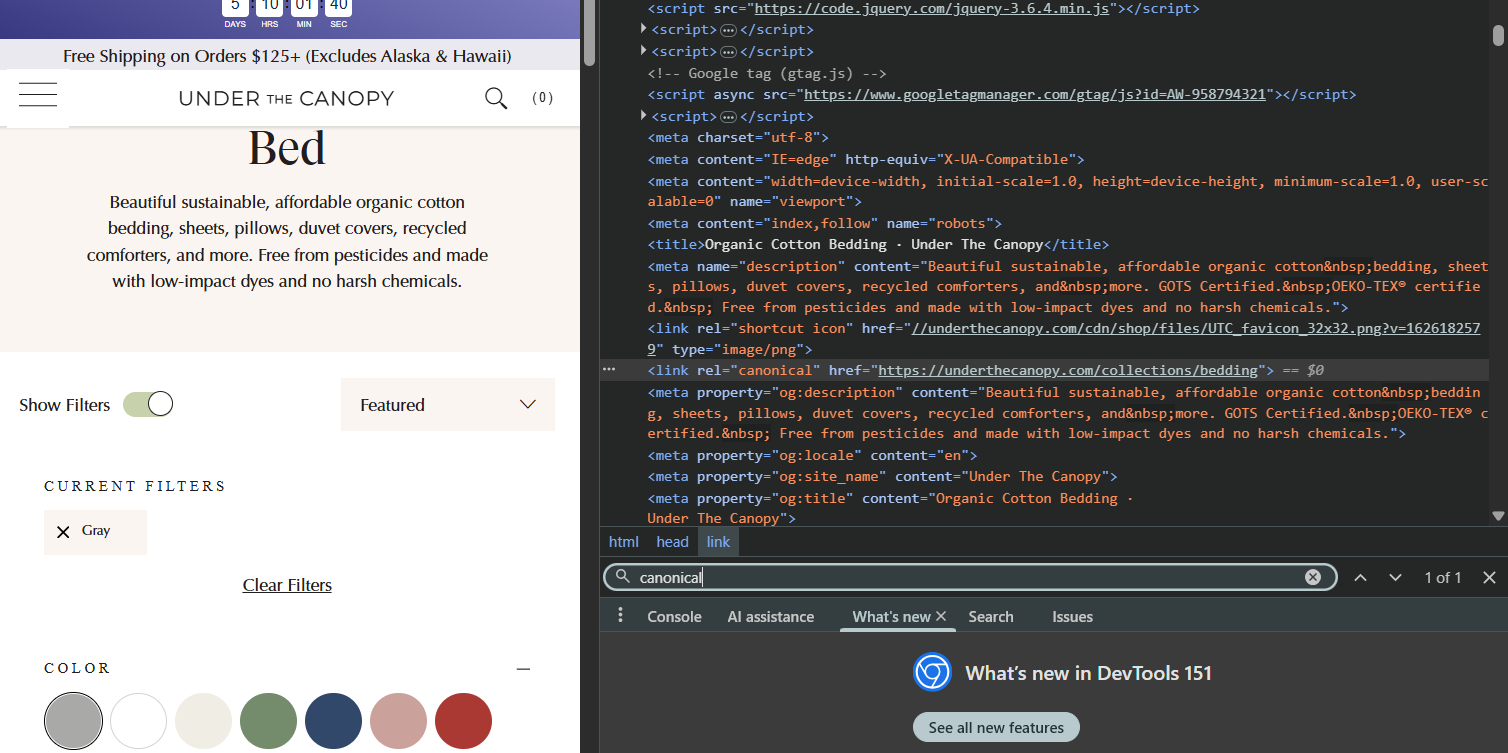
The fix for most stores has two parts. First, canonicalize filtered and faceted URLs back to the master collection page.
This should happen automatically on most themes, but it's genuinely worth double-checking rather than assuming: view the page source on a filtered URL and search for the canonical tag directly to confirm it's pointing at the clean, unfiltered version.
Second, block those same filter URL patterns in your robots.txt file directly.
Canonical tags stop the filtered version from being indexed. But the page still gets crawled, which still costs crawl budget.
Blocking the pattern in robots.txt is what actually saves that budget.
Here's the actual standard ruleset we add on top of Shopify's own default robots.txt for every client:
# Custom Rules for Blocking Specific Pages

User-agent: *
Disallow: /collections/vendors
Disallow: /collections/all
Disallow: /collections/new
Disallow: /blogs/*/tagged/*
Disallow: /*?q=*
Disallow: /collections/*/*
Disallow: /*?filter.
Disallow: /*&filter.
Disallow: /*?sort_by=
Disallow: /*&sort_by=
The last four lines are the ones directly relevant here: they block faceted filter and sort-order URLs specifically.
The rest of the block is worth adopting wholesale too, since it's cleaning up the same underlying problem.
/collections/vendors, /collections/all, and /collections/new are Shopify's own auto-generated catch-all pages, none of which can be tied to one specific keyword.
/blogs/*/tagged/* blocks auto-generated blog tag pages. /*?q=* blocks internal search result pages.
/collections/*/* blocks the double-nested product URL pattern (/collections/x/products/y) that some themes still generate by default alongside the clean /products/y version.
Several popular Shopify filter apps handle the canonical tag piece automatically, but confirm it directly rather than assuming, and add the robots.txt blocking yourself either way.
Collection vs. Collection Cannibalization
Beyond product-versus-collection cannibalization (covered earlier), it's worth checking whether two of your own collections are quietly targeting the same intent.
Start with the site: search operator. Search site:yourstore.com [target keyword] (domain and keyword together, no space after site:) to find the pages Google associates with the topic. Treat this as a discovery check, not proof of cannibalization by itself.
The example below shows the kind of overlap worth investigating. However, the product page would not necessarily be a problem if Alpine waterproof hiking boots had meaningful search demand and a distinct product-led SERP.
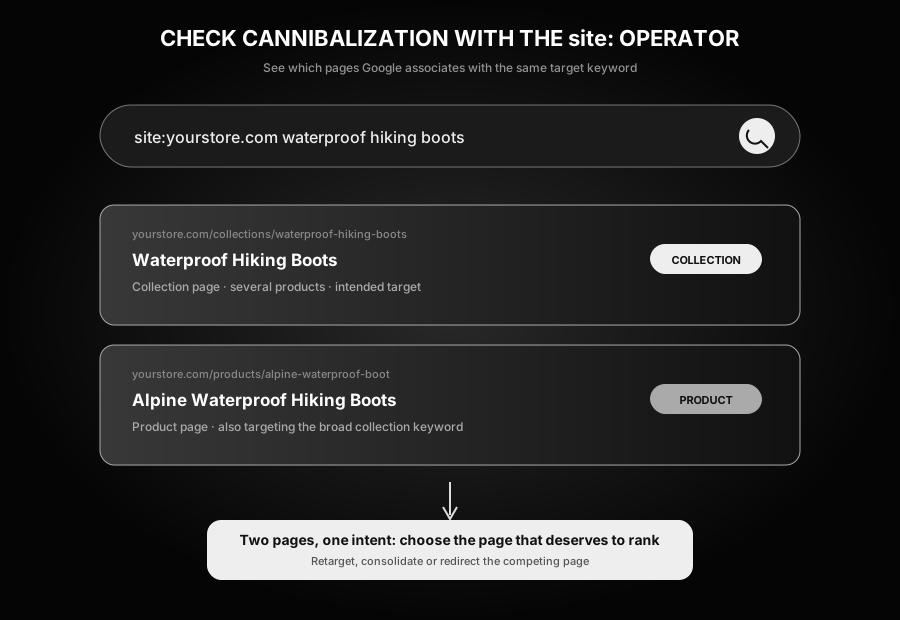
Here is what that check looks like on a real store:
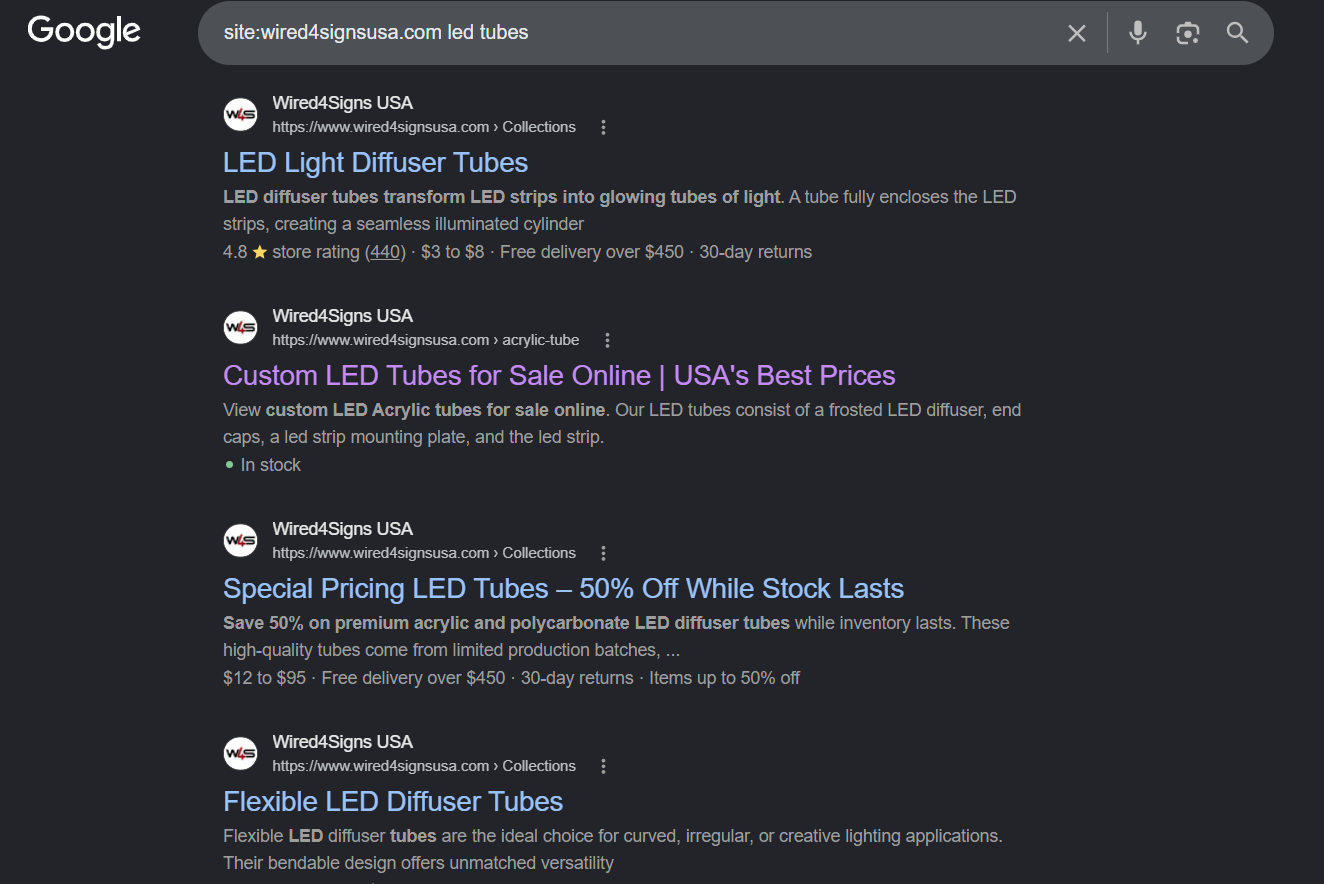
For the broad query LED tubes, the first three results may be competing for substantially the same intent: LED Light Diffuser Tubes, Custom LED Tubes, and Special Pricing LED Tubes. That is a reason to inspect their target keywords, metadata, content, internal links, and actual rankings more closely.
The fourth result is different. Flexible LED Diffuser Tubes is a legitimate subcollection of the main LED tubes collection, built around the more specific long-tail keyword flexible LED diffuser tubes. It should not be consolidated merely because it appears in the same site: search.
To confirm cannibalization, search the target keyword normally and see which of your pages is ranking. Then compare the live SERPs for each candidate keyword and check Google Search Console to see which URLs receive impressions for each query. If largely the same results appear for both keywords and Google alternates between your pages, splits impressions across them, or ranks the wrong page, you probably have a genuine cannibalization issue.
If the two results pages are genuinely distinct, both collections earn their place, and each should be optimized with its own precise anchor text pointing at it.
Pagination, Not Infinite Scroll
If a collection has enough products to need more than one page, use standard pagination rather than infinite scroll.
Infinite scroll only loads additional products as a visitor scrolls down the page, which means Googlebot, which doesn't scroll and interact with a page the way a person does, often never actually sees those later products or the internal links attached to them.
The link structure and product content effectively become invisible to Google.
Pagination avoids that problem, since every product and link is present in the page's actual HTML from the start.
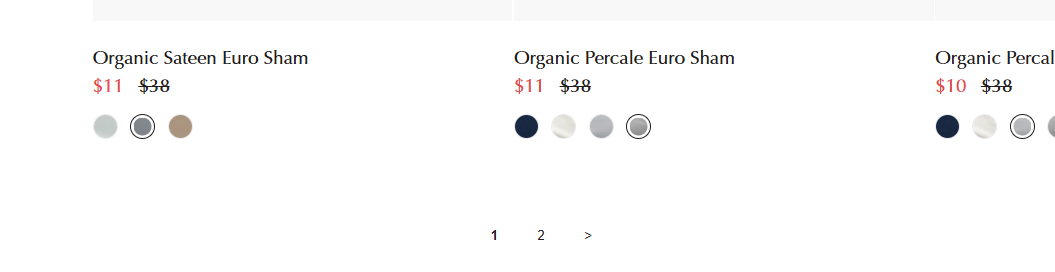
The one real downside is that it creates near-duplicate page-2, page-3, and so on URLs. Resist the urge to noindex or block those pages though. Doing so hides the internal links they carry just as effectively as infinite scroll does.
In practice, cannibalization between a collection's main page and its later pagination pages isn't usually a real problem worth engineering around.
Page Speed
Page speed on collection pages mostly comes down to images, since that's usually the heaviest thing on the page.
Convert banner and product images to WebP where you can.
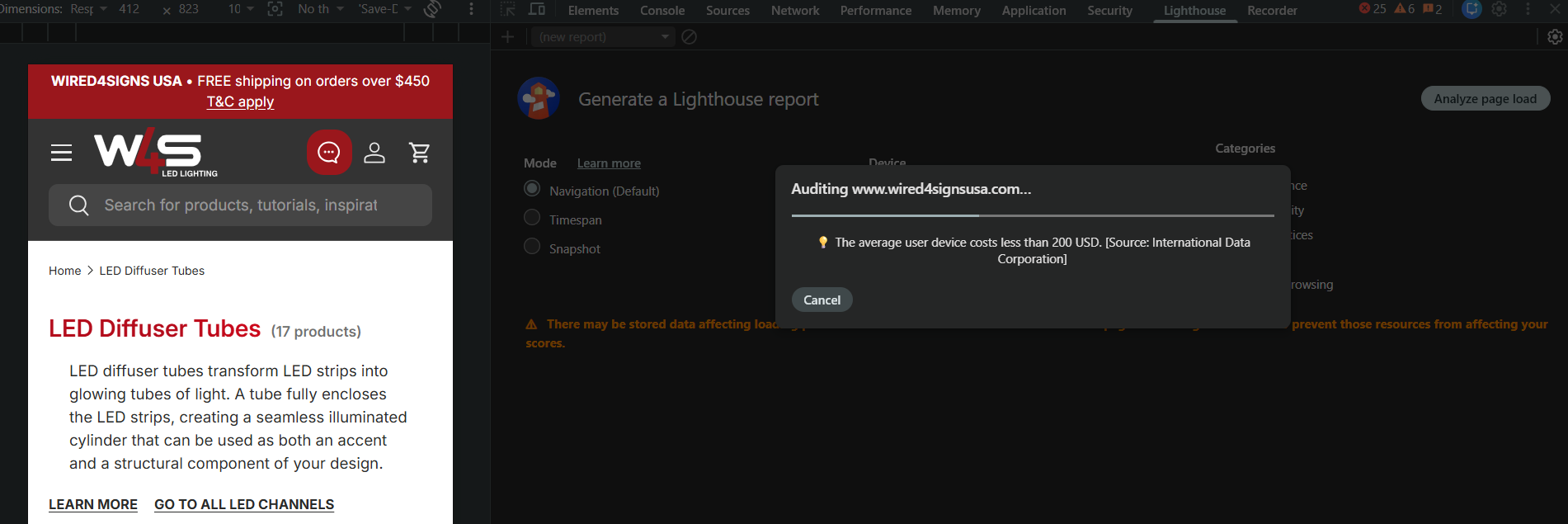
Run a real Google Lighthouse report specifically on the collection page template you use for your priority collections, not just the homepage. Open the page in a Chrome Incognito window before running the report. This reduces the chance of browser extensions, cached assets, cookies, and other stored site data distorting the result.
Open Chrome DevTools, select Lighthouse, choose the mobile device test, and run the page-load analysis against the live collection page.
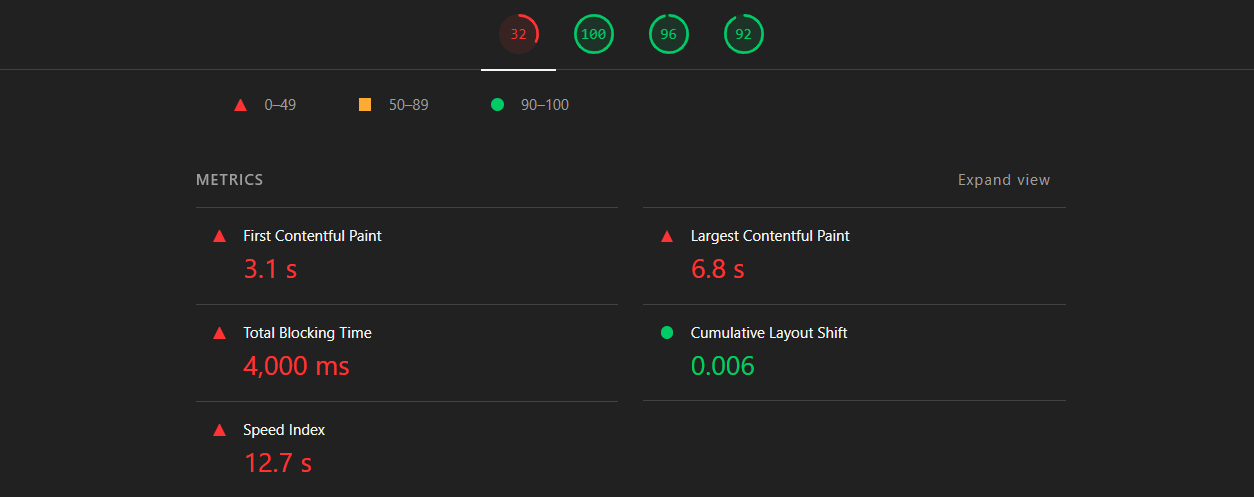
The overall scores give you the quick diagnosis. In this example, accessibility, best practices, and SEO score well, but the performance score of 32 immediately shows where the work is needed.
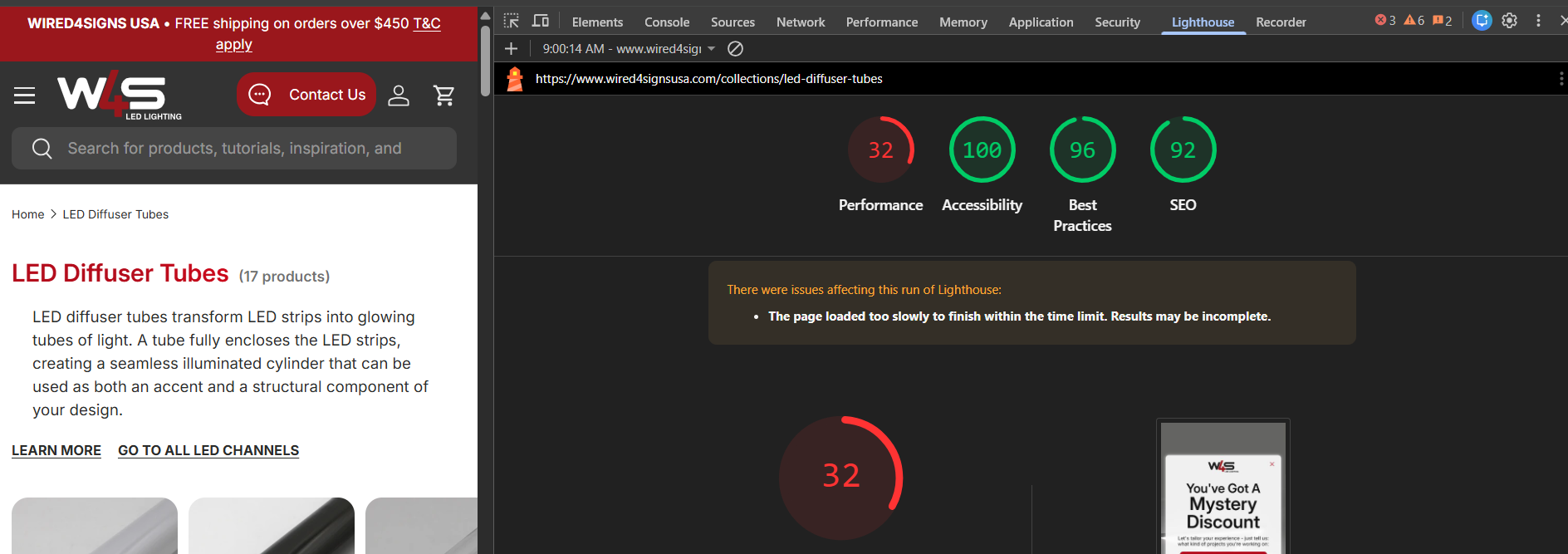
Then inspect the individual metrics rather than stopping at the headline score. Here, the 6.8-second Largest Contentful Paint, 4,000-millisecond Total Blocking Time, and 12.7-second Speed Index are the clearest priorities, while the 0.006 Cumulative Layout Shift is already healthy.
Review what Lighthouse flags and fix the handful of issues that are genuinely worth fixing. Dropping the report into an AI tool for a plain-language explanation is a reasonable way to triage it, but test again after making changes rather than assuming every recommendation improved the page.
Keep the page itself simple and uncluttered. Image optimization alone is one of the biggest, easiest speed wins available on a typical collection page.
The Complete Shopify Collection Page SEO Checklist
Use this as a final pass across a collection page before calling it done.
Treat it as the actual shopify collection page seo optimization best practices list, not just a suggestion: every item below has shown up as a real, specific fix in real client work above.
Keyword research
- One to three closely related target keywords chosen per collection, matched to the right page type (collection vs. product) based on how broad or specific the term actually is
- Search intent confirmed as transactional or commercial, not informational
- Subcollection opportunities mapped by attribute, feature, and use case, not just the obvious top-level categories
Page structure
- At least 2 products before building it as a standalone collection
- No banner image above the grid unless it has a real, justified reason to be there
- H1 (collection title) set to the plain target keyword
Content
- 50-100 words above the grid, keyword front-loaded in the first sentence
- 400-500 words below the grid (or benchmarked against the actual top 3 ranking pages), covering real differentiators and buying guidance
- One H2 and 2-4 H3s below the grid, each covering a genuinely specific point
- Extra content depth budgeted in for any YMYL-adjacent niche
- Above-grid and below-grid content split via a metafield-driven rich text section, or the Liquid
<!-- split -->technique if using a single description field
Keyword placement
- H1 (collection title), meta title, meta description, first sentence, and at least two subheadings all carrying the primary keyword
- Secondary/synonym keywords worked naturally throughout the body
- Checked against sibling product pages for cannibalization
Internal linking
- Your genuine priority collections identified and given extra internal-link weight
- Linked from the main menu and, for larger/priority collections, the footer
- Within 2-3 clicks of the homepage
- 4-6 links to sibling subcollections, using varied, real (not image-only) anchor text
- Relevant blog posts linking down to this collection; this page never linking up to a blog post
Backlinks
- Reserved for the homepage, collections, and blog content, never product pages
- A backlink gap analysis run against the top-ranking competitor pages for the target keyword
- Any prospective linking site checked against domain authority, traffic, trend, and referring-to-outbound ratio thresholds before paying
Technical
BreadcrumbListandCollectionPage/ItemListschema present and validatedFAQPageschema added alongside it if the page has an FAQ section- Faceted/filtered URLs canonicalized to the master collection page, and blocked in
robots.txt - Checked against other collections for keyword overlap using the
site:search operator - Pagination used instead of infinite scroll on multi-page collections
- Collection template images converted to WebP, and a Lighthouse report run on the template
Key Takeaways
- Collection pages and product pages, not blog posts or the homepage, are where most Shopify SEO revenue actually comes from.
- Match the keyword to the right page type: broader, multi-product terms belong on a collection page; narrow, single-product, or branded searches belong on a product page.
- Building subcollections around real product attributes, features, and use cases (the Moneyball approach, a term coined by Kai Cromwell) is one of the most underused strategies available, and it works faster than chasing a single competitive broad term.
- Shopify's flat URL structure is a real limitation. Solve it with standalone subcollections and strong internal linking, not by fighting the platform.
- More content isn't automatically better. Match what's actually ranking for your specific keyword, and use position tracking, not word count, to find the real sweet spot.
- Internal linking is the highest-leverage, lowest-cost lever most stores never pull. Identify your priority collections and give them disproportionate internal-link weight.
- Backlinks should mostly go to the homepage and blog content, not collections directly, with internal linking carrying authority the rest of the way down. A backlink gap analysis tells you a real number to work toward.
- Every collection page needs
BreadcrumbListandCollectionPage/ItemListschema, andFAQPagealongside it whenever there's real FAQ content on the page.
Frequently Asked Questions About Shopify Collection Page SEO
As many as your product catalog can realistically support with genuine, distinct classifications, well beyond the obvious top-level categories.
Stores with hundreds of well-targeted collections consistently outperform stores with a handful of broad ones, because each collection is a new entry point for a slightly different search.
Two. Fewer than that reads as thin content to both Google and a human visitor, and you're usually better off optimizing a single product page directly for that keyword instead.
We'd generally recommend keeping the main content out in the open rather than tucking it behind an accordion.
That said, it's not the end of the world either way, and FAQs specifically are often fine inside an accordion purely for a neater, cleaner user experience.
What matters more is that the short intro above the grid stays fully visible, not buried or hidden by default.
Not always. Use FAQs on a collection page when they add real, specific value to that category, not as a default template element on every page.
Checking what the current top-ranking pages for your keyword are doing is a good way to confirm whether FAQs are actually expected there.
When you do include them, source the questions from Google's "People Also Asked" results, real customer support tickets, or reviews, and add FAQPage schema alongside BreadcrumbList.
The core methods are the same either way: Google Search Console for pages that already exist, a SERP intent check for new ones, and a real keyword research tool to find the full spread of variations.
The difference is in scope. A product keyword is usually tied to one very specific item, sometimes an exact product name or model, like a specific waterproofing board a manufacturer sells under its own product name.
A collection keyword covers the broader category that product sits inside, like "waterproof tile backer board." The subcollection strategy is what lets a collection page be deliberately built out into several more specific variants of that same broader category, rather than staying as one broad page.
Yes, particularly for less competitive, longer-tail subcollection terms on a site with reasonable existing domain authority.
Our own general approach is to build out the content and internal linking first, and see how a page performs before spending anything on backlinks. Strong internal linking and genuinely differentiated content can carry a lot of the work on their own.
When that alone isn't enough to get a page competitive, a backlink gap analysis (covered earlier) tells you specifically how much additional authority the page actually needs.
Start with the site: search operator: search site:yourstore.com [target keyword] and see which of your own pages Google associates with the topic. This identifies pages to investigate; it does not prove cannibalization on its own.
Next, search the target keyword on the live SERP and check which URL actually ranks. A product page ranking for a specific product query can be completely correct even when a broader collection exists. The warning signs are two pages targeting the same intent, rankings alternating between them, impressions being split, or the wrong page ranking for the exact query.
Google Search Console's performance report, filtered to that specific query, will show which of your pages receive impressions and help confirm whether the signals are genuinely being split.
If there's genuine, ongoing search demand for that specific category, work on filling it out with real inventory or folding it into a broader collection rather than noindexing it outright.
Reserve noindex for collections with no real keyword demand behind them at all, like a leftover seasonal or sale collection nobody is actually searching for.
A single competitive broad-term collection built from zero authority can realistically take a year or more.
This is exactly why the subcollection strategy matters: longer-tail subcollections built around the same broad term typically rank within weeks to a few months, since they're competing for far less contested search terms.
They can, if the resulting filtered URLs are left fully crawlable and indexable.
A collection with several filter types can generate hundreds of near-duplicate URLs competing against your actual target page.
Canonicalizing filtered URLs back to the master collection page handles the indexing side. Blocking the same filter URL patterns in robots.txt is what actually saves the crawl budget those URLs would otherwise burn.
Missing the opportunity to build out sub-collections targeting long-tail keyword variants, and instead sitting on just a handful of broad, generic collections.
Most Shopify stores under-invest in their collection catalog specifically because they think about their customer journey too narrowly, missing the reality that a stranger with real buying intent very often lands directly on a collection page with zero prior awareness of the brand at all.